


Networking can feel overwhelming, but a small set of concepts carries most of the weight in interviews and real-world systems.
In this article, we w’ll cover 20 most important networking concepts divided into 5 groups: Addressing, Packets and Layers, Protocols, Infrastructure, and Performance.
Let’s start with the most basic question: how do devices find each other?
Addressing
1. IP Address
Every device on a network needs an address so other devices can find it. That address is called an IP address.
There are two versions in use:
IPv4 looks like
142.250.80.46. It uses four numbers from 0 to 255 and supports about 4.3 billion addresses.IPv6 looks like
2001:db8:85a3::8a2e:370:7334. It uses a much larger address space built for the modern internet.
IP addresses can also be public or private.
Your laptop:    192.168.1.10     private
Home router:    73.128.42.15     public
Google server:  142.250.80.46    public
Your laptop uses a private IP inside your home network. Your router has a public IP on the internet and translates traffic between the two.
But nobody wants to memorize IP addresses for every website server.
That is where DNS comes in.
2. DNS
DNS, or Domain Name System, translates a human-friendly name like google.com into an IP address like 142.250.80.46.
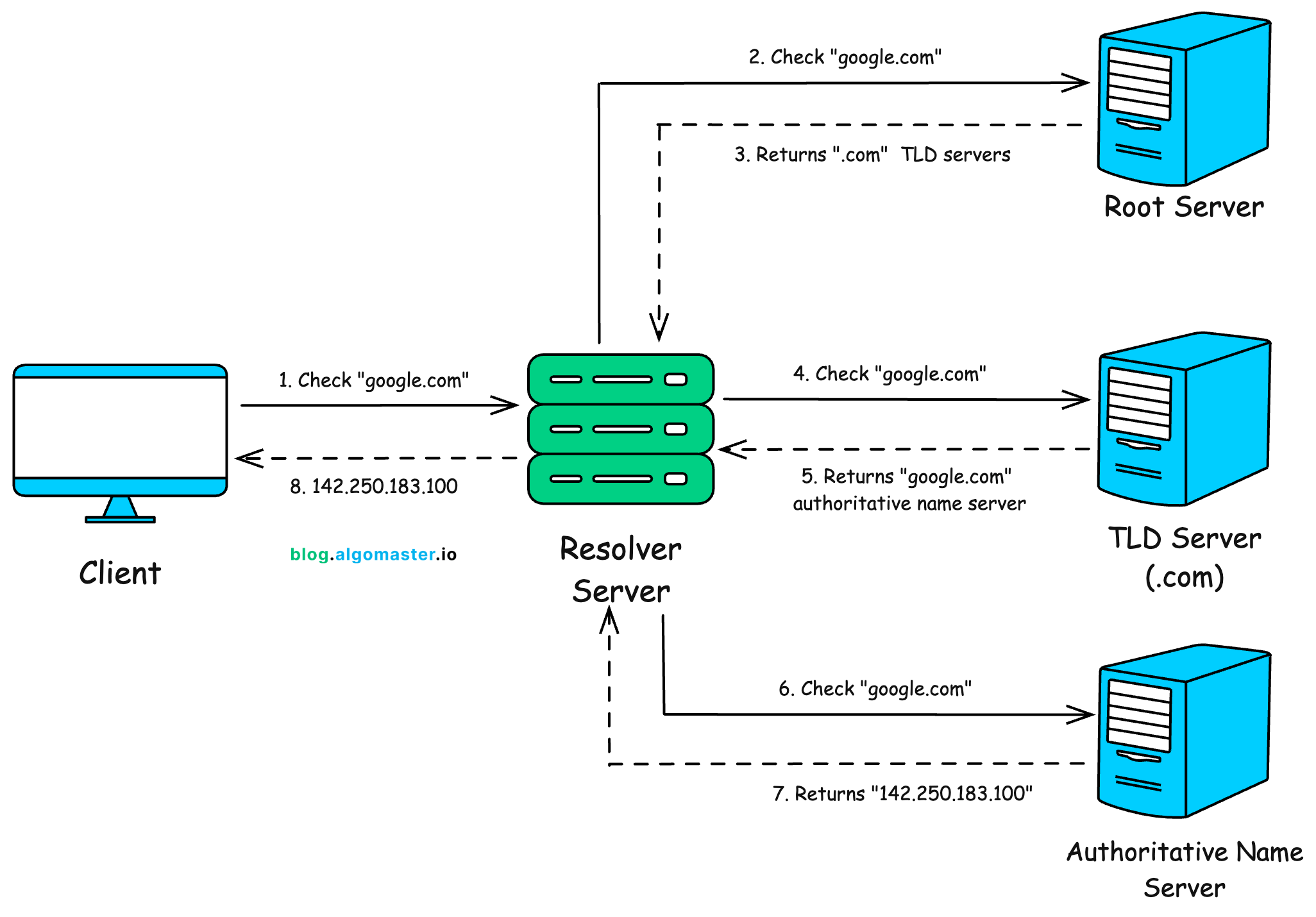
First, the browser and operating system check if they already know the answer. If not, the request goes to a recursive resolver, usually run by your ISP or a public provider like Google DNS.
The resolver then walks the DNS hierarchy: root server, TLD server like .com, and finally the authoritative name server for the domain.
The result is cached at multiple levels, so most DNS lookups are fast.
DNS and IP get traffic to the right machine. But a machine runs many programs, so how does traffic reach the right one?
3. Ports
An IP address gets traffic to the right machine. A port gets it to the right program on that machine.
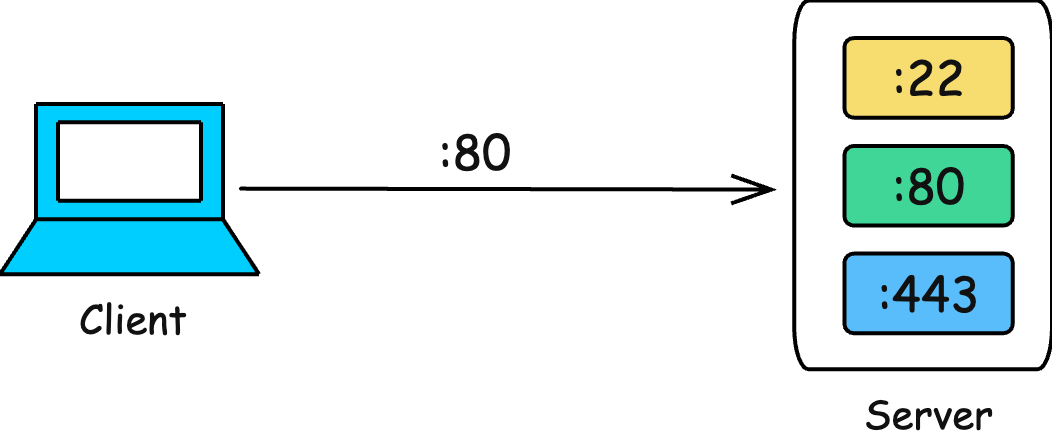
Ports are numbers from 0 to 65535. Some common ports are:
22: SSH
53: DNS
80: HTTP
443: HTTPS
5432: PostgreSQL
6379: Redis
When you visit a website, your browser connects to port 443 by default.
A server is usually identified by an (IP, port) pair. That is why two web servers on the same machine need different ports, like 8080 and 8081.
Now we know how to reach the right machine and process. But inside a local network, how does traffic find the right physical device?
4. MAC Address
A MAC address is a hardware address assigned to a network interface, usually written like a4:83:e7:1b:22:9c.
IP addresses help route traffic across networks. MAC addresses help deliver traffic inside the same local network, like your home Wi-Fi or office LAN.
When your laptop wants to talk to another device on the same network, it uses ARP to ask:
Who has IP 192.168.1.20?The device with that IP replies with its MAC address. The switch then uses that MAC address to forward the data to the right device.
IPs can change when you move networks or get a new DHCP assignment. MAC addresses are meant to be fixed, though modern devices often randomize them on public Wi-Fi for privacy.
You rarely configure MAC addresses yourself, but you may see them in DHCP reservations, firewall rules, and switch settings.
5. NAT
Most homes have many devices but only one public IP address. NAT, or Network Address Translation, lets all those devices share that one public IP.
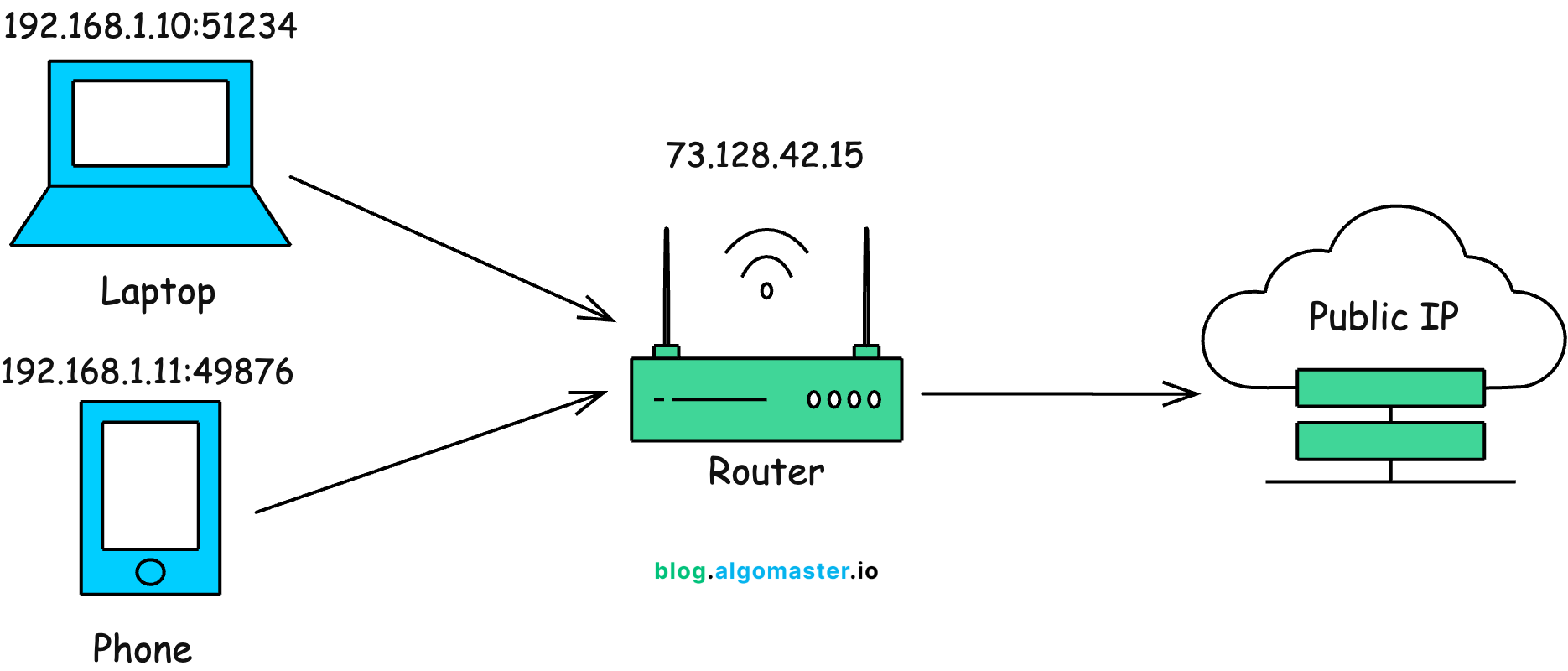
When your laptop sends a request to the internet, the router replaces the private IP and port with its own public IP and a new port.
192.168.1.10:51234  →  73.128.42.15:40001
192.168.1.11:49876  →  73.128.42.15:40002
The router stores this mapping in a NAT table, so when responses come back, it knows which internal device should receive them.
From the internet’s point of view, it looks like one machine making many connections.
NAT helped IPv4 survive the address shortage. It is also one reason peer-to-peer connections are harder, because two devices behind NAT cannot always connect directly without help.
6. DHCP
DHCP, or Dynamic Host Configuration Protocol, gives a device its network settings automatically when it joins a network.
Without DHCP, you would have to manually configure the IP address, subnet mask, default gateway, and DNS server for every device.
The DHCP flow is often called DORA:
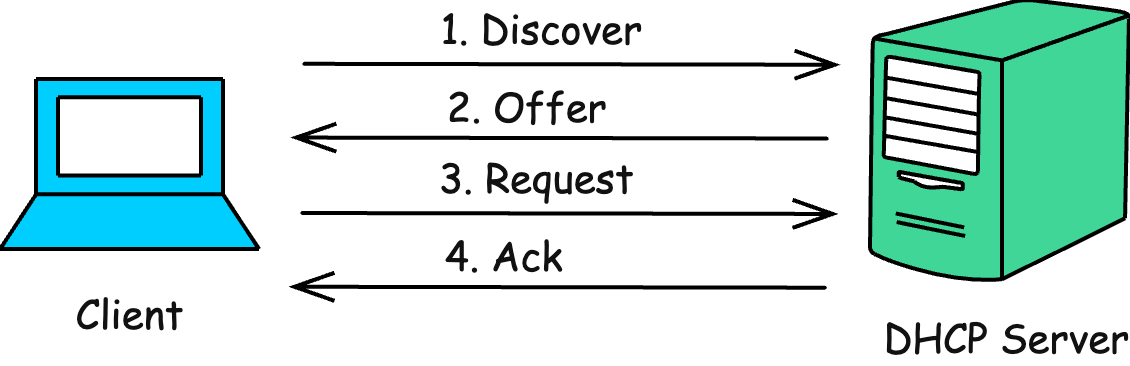
Discover: Client asks, “Is there an IP for me?”
Offer: DHCP server offers an available IP
Request: Client asks to use that IP
Acknowledge: Server confirms and records the lease
The IP is usually leased for a limited time. When the lease is close to expiring, the device renews it.
Packets and Layers
7. Packets
Data does not travel across a network as one big blob. It is broken into smaller chunks called packets.
Each packet carries metadata, such as source IP, destination IP, sequence number, and a small part of the actual data.
Example:
Message: "Hello, this is a long message from the server"

Packet 1: seq=1, data="Hello, thi"
Packet 2: seq=2, data="s is a lon"
Packet 3: seq=3, data="g message "
Packet 4: seq=4, data="from the s"
Packets may take different routes, arrive out of order, or get dropped. The receiving side has to put them back together.
That is why the transport layer matters.
8. OSI Model
The OSI model is a 7-layer mental model for how networking is organized. Real systems often use the simpler TCP/IP model, but OSI is still useful vocabulary.
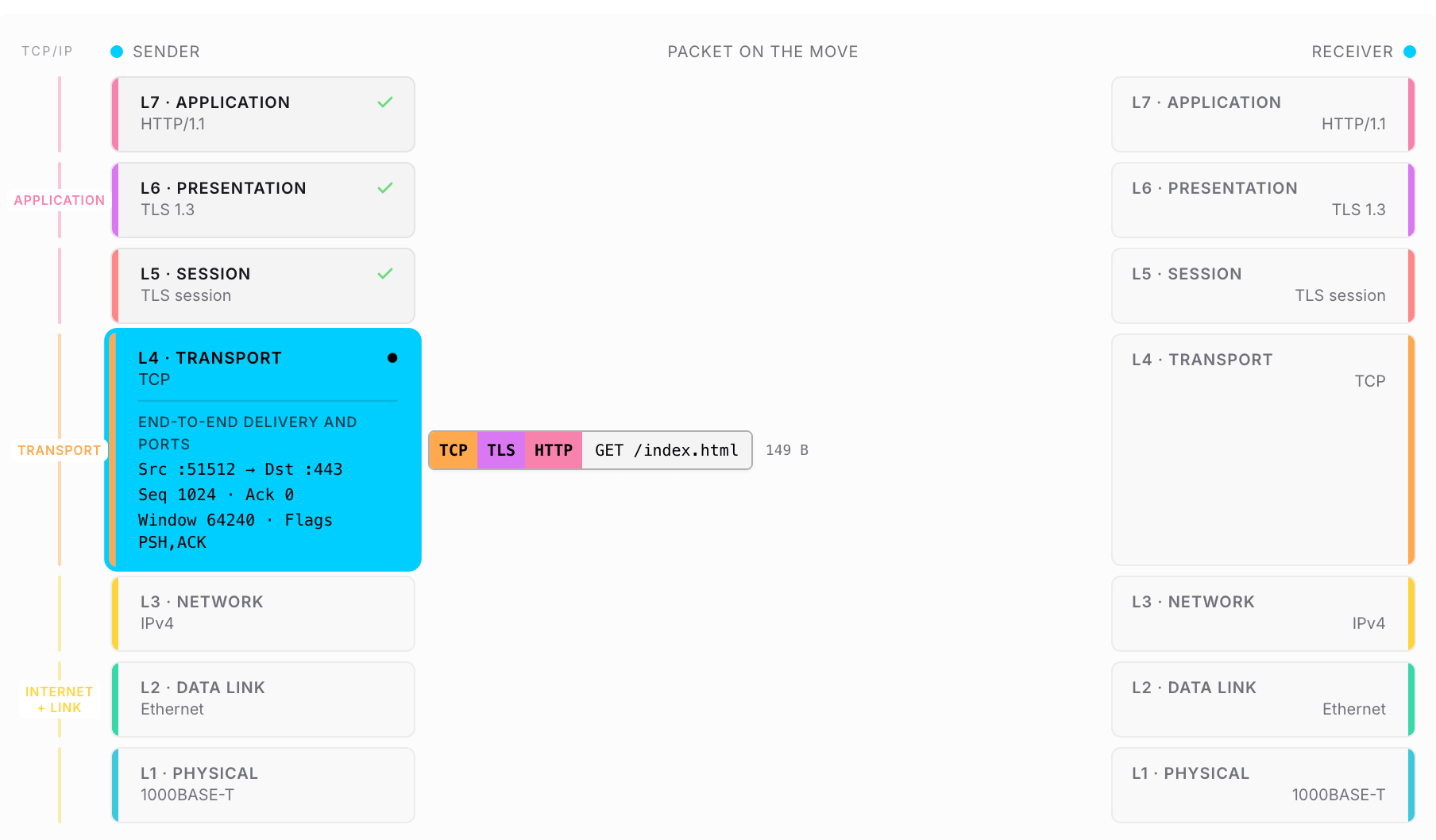
Each layer only depends on the layer above and below it. HTTP does not need to know how IP routing works. TCP does not care whether bytes travel over Wi-Fi, Ethernet, or fiber.
That separation is why you can change the underlying network without rewriting your application.
For most engineers, layers 3, 4, and 7 matter the most:
Layer 3: IP and routing
Layer 4: TCP and UDP
Layer 7: HTTP, DNS, and application protocols
9. Subnetting and CIDR
A subnet is a smaller logical slice of an IP network. Subnetting lets us split one large network into smaller, manageable parts.
CIDR is the notation used to describe those slices.
Example: 192.168.1.0/24
Here, /24 means the first 24 bits identify the network. The remaining bits are used for devices inside that network.
Subnetting is common in cloud networks. For example, you might create a production VPC as 10.0.0.0/16 and give each availability zone a smaller slice.
It also makes firewall rules cleaner:
Allow 10.0.1.0/24 to access the databaseThat is much better than listing hundreds of IP addresses manually.
10. Router vs Switch
Routers and switches both move traffic, but they work at different layers.
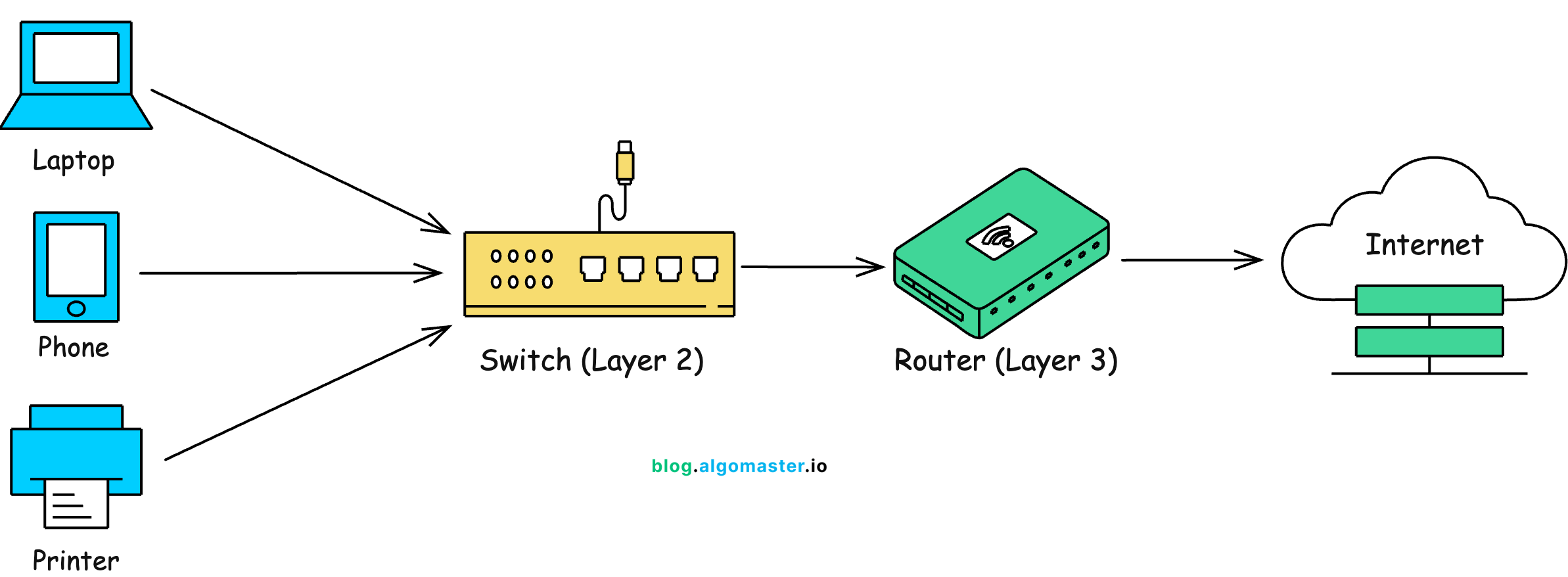
A switch works at layer 2. It connects devices inside the same local network and forwards data using MAC addresses.
A router works at layer 3. It connects different networks and forwards packets using IP addresses.
Your home router is usually a router, switch, and Wi-Fi access point combined in one box.
Switches keep local traffic fast. Routers decide where packets should go next, including across the internet.
Protocols
11. TCP vs UDP
At the transport layer, the two most common protocols are TCP and UDP.
TCP is reliable. It creates a connection before sending data, tracks what was sent, retries lost data, and delivers everything in order.
Use TCP when correctness matters: web pages, APIs, databases, SSH, and file transfers.
UDP is lighter and faster. It sends data without creating a connection, and it does not guarantee delivery or ordering.
Use UDP when low latency matters more than perfect reliability: video calls, DNS, online gaming, and live telemetry.
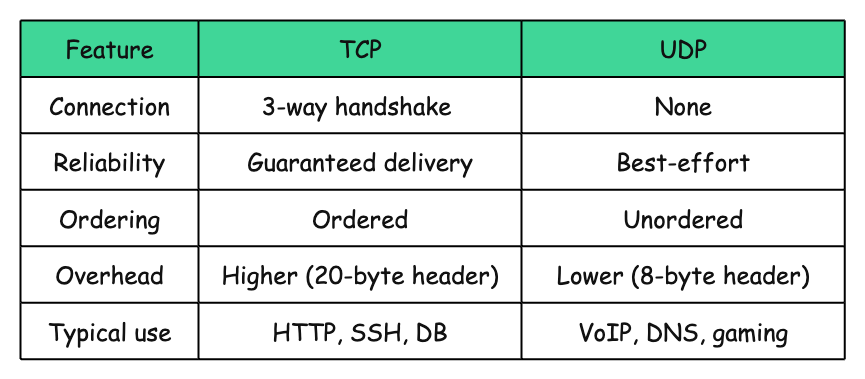
Modern protocols like QUIC, used by HTTP/3, are built on UDP. They keep UDP’s speed benefits while adding reliability at the protocol level.
12. HTTP / HTTPS
HTTP is the request-response protocol behind the web.
A client sends a request. The server sends back a response with a status code, headers, and a body.
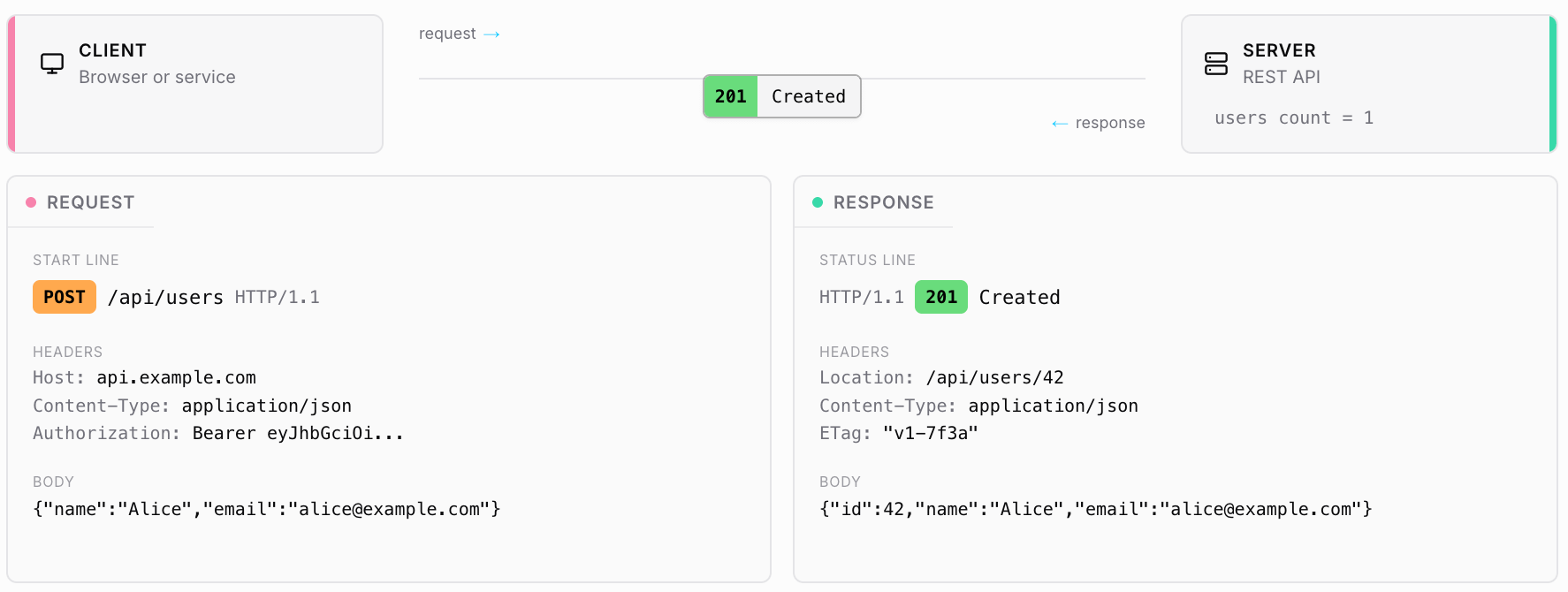
HTTP is stateless. Each request is independent, so cookies, sessions, and tokens are used to remember who the user is between requests.
HTTPS is HTTP over TLS.
The request format stays mostly the same, but the connection is encrypted and the server’s identity is verified.
For public websites and APIs, HTTPS is the default today. Plain HTTP should be treated as the exception.
13. TLS
TLS, or Transport Layer Security, is what puts the S in HTTPS.
It gives HTTPS three important guarantees:
Confidentiality: Others cannot read the data
Integrity: Data cannot be silently changed in transit
Authenticity: The server is really who it claims to be
At a high level, the TLS handshake works like this:
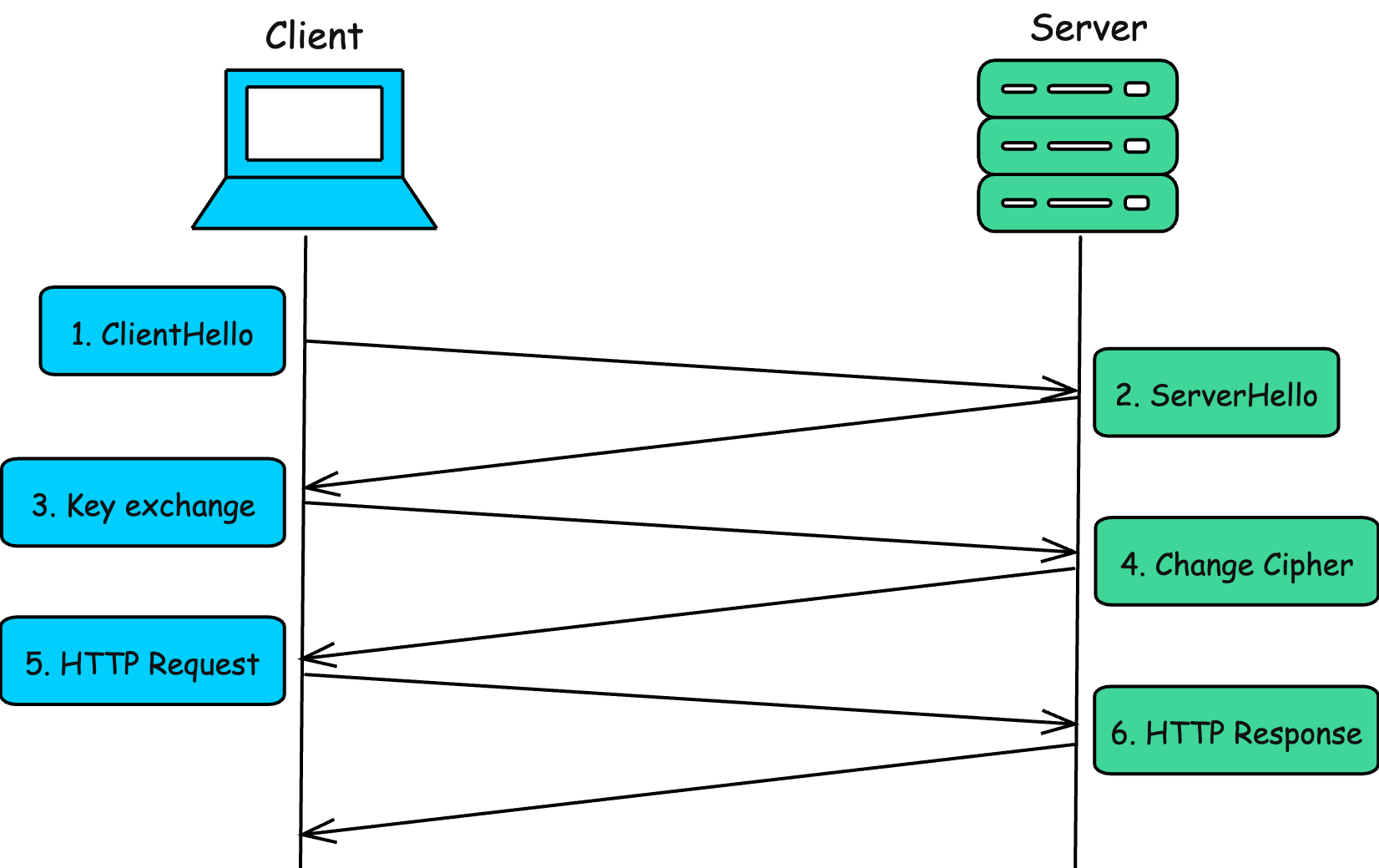
The server certificate is signed by a trusted Certificate Authority. The browser verifies it before trusting the connection.
After the handshake, both sides use fast symmetric encryption for the actual data transfer.
TLS 1.3 made this process much faster by reducing the number of round trips. With session resumption, repeat connections can be even faster.
14. WebSocket
HTTP is request-response. The client asks, the server replies.
That works well for normal web pages and APIs, but not for apps where the server needs to push updates instantly, like chat, live scores, trading dashboards, multiplayer games, or collaborative editing.
A WebSocket is a persistent, two-way connection between a client and server.
It starts as an HTTP request and then upgrades to a WebSocket connection:
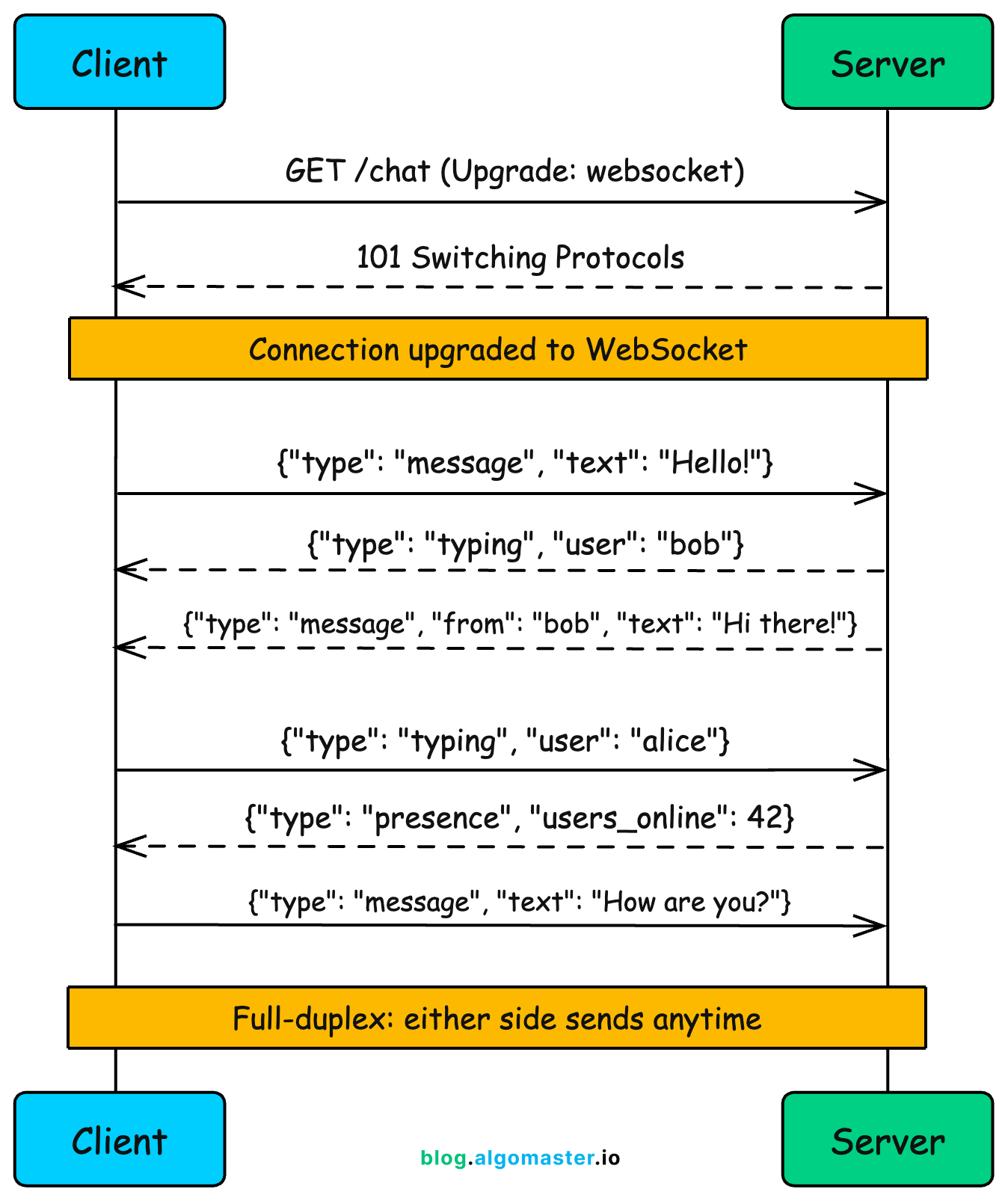
After the upgrade, both sides can send messages anytime without creating a new HTTP request for every update.
Use WebSockets when you need real-time, two-way communication.
For one-way server-to-client updates, Server-Sent Events, or SSE, is often a simpler option.
Infrastructure
15. Firewall
A firewall controls which network traffic is allowed in or out.
It checks traffic against rules based on fields like source IP, destination IP, port, and protocol.
ALLOW tcp from any to 10.0.1.0/24 port 443
ALLOW tcp from 10.0.0.0/16 to 10.0.2.10 port 5432
DENY  all from any to any
The last rule is important: block everything that is not explicitly allowed.
Firewalls can be stateful or stateless.
A stateful firewall tracks active connections. If your server sends a request out, the response is allowed back in automatically.
A stateless firewall checks each packet independently. It is simpler, but less flexible.
In cloud platforms, you usually see firewalls as security groups in AWS, NSGs in Azure, or firewall rules in GCP.
16. VPN
A VPN, or Virtual Private Network, creates an encrypted tunnel over the public internet.
It makes a remote device behave as if it is connected to a private network.

Two common use cases:
Corporate VPN: Lets employees access internal company systems from outside the office
Consumer VPN: Routes traffic through a VPN provider to hide the user’s public IP or change apparent location
VPNs are built using protocols like WireGuard, OpenVPN, or IPsec.
The key idea is simple: traffic goes through an encrypted tunnel before reaching the destination.
But a VPN does not make you fully anonymous. The VPN provider can still see where your traffic is going, so you are shifting trust from your ISP or network provider to the VPN provider.
17. Proxy vs Reverse Proxy
A proxy sits between a client and a server. The difference is which side it represents.
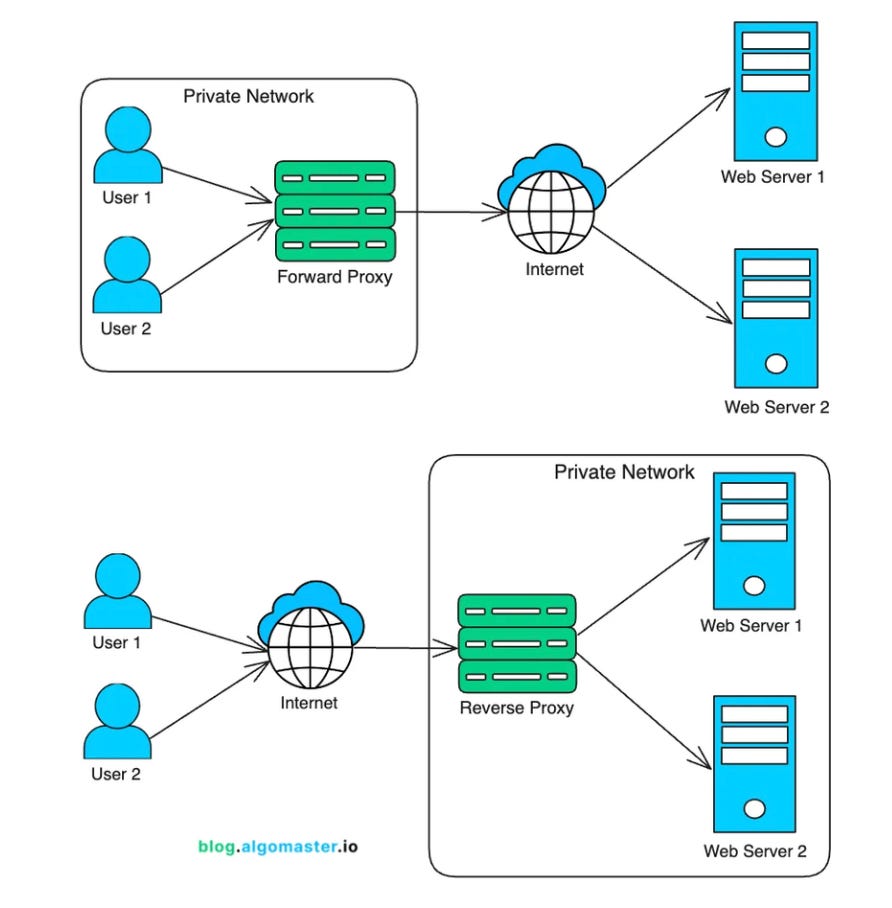
A forward proxy sits in front of clients. It forwards client requests to the internet.
Companies use forward proxies for content filtering, caching, and hiding internal IPs.
A reverse proxy sits in front of servers. Clients send requests to the reverse proxy, and it forwards them to the right backend server.
Reverse proxies are common in production systems. They can terminate TLS, cache responses, rate-limit clients, and route traffic to different backend services.
Tools like Nginx, HAProxy, Envoy, and Cloudflare often work as reverse proxies.
18. Load Balancer
Once you have multiple backend servers, you need a way to spread traffic across them. That is what a load balancer does.
A load balancer is usually a reverse proxy that decides which backend should handle each request.

Common algorithms:
Round robin: Send each request to the next server
Least connections: Send traffic to the server with the fewest active connections
IP hash: Send the same client IP to the same server
Weighted: Send more traffic to stronger servers
Load balancers also run health checks. If a server stops responding, the load balancer removes it from rotation and sends traffic to healthy servers.
This is how one bad instance does not bring down the whole service.
19. CDN
A CDN, or Content Delivery Network, is a group of servers spread across the world that cache content close to users.
Instead of every request going back to the origin server, the CDN serves cached content from a nearby edge location.
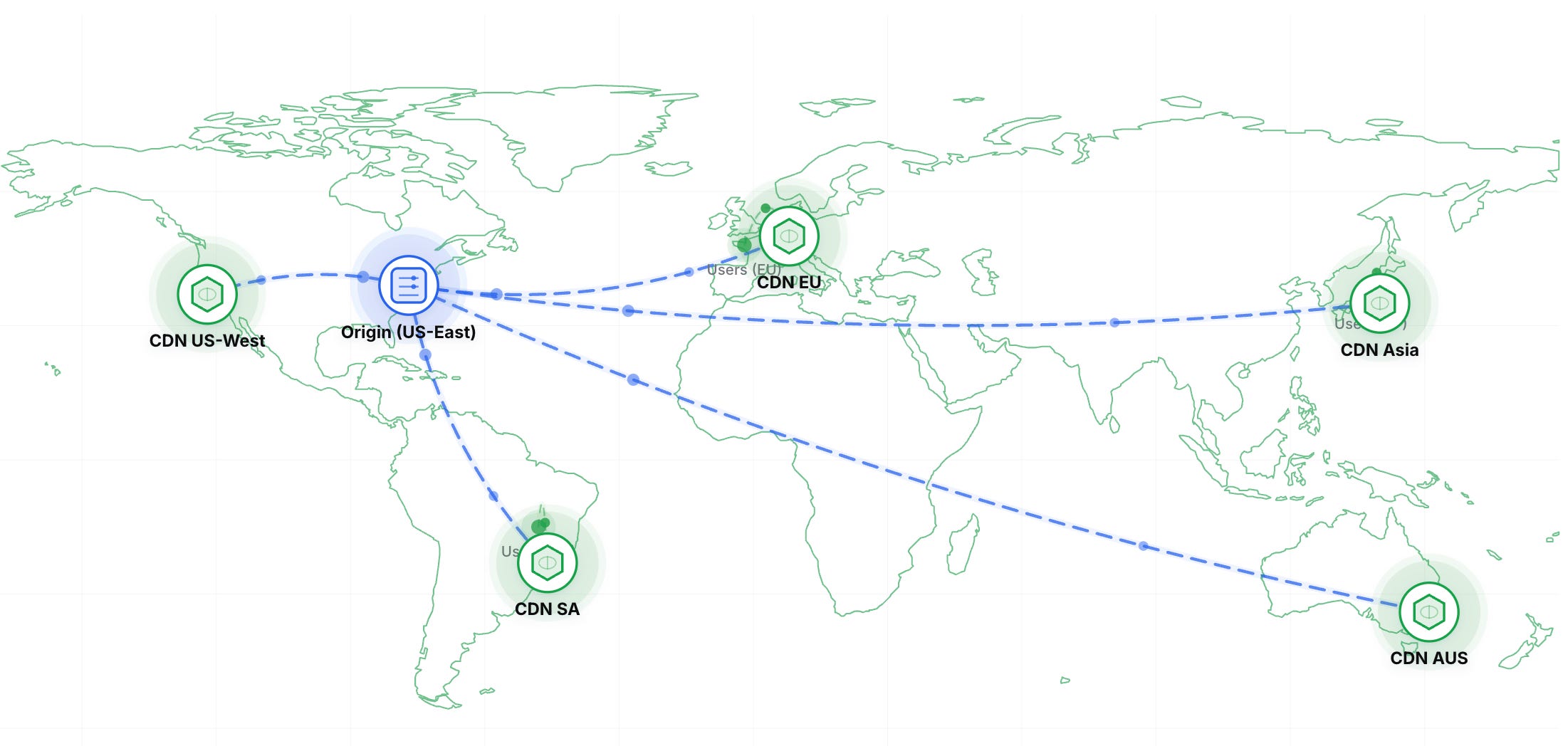
This reduces latency because data travels a shorter distance.
CDNs are commonly used for static assets like images, CSS, JavaScript, and video. Modern CDNs can also cache API responses, terminate TLS, run edge functions, and help absorb DDoS attacks.
Performance
20. Latency vs Bandwidth vs Throughput
Latency, bandwidth, and throughput are often mixed up, but they mean different things.
Latency: How long one packet takes to travel from source to destination
Bandwidth: The maximum amount of data a network can carry per second
Throughput: The actual amount of data transferred per second
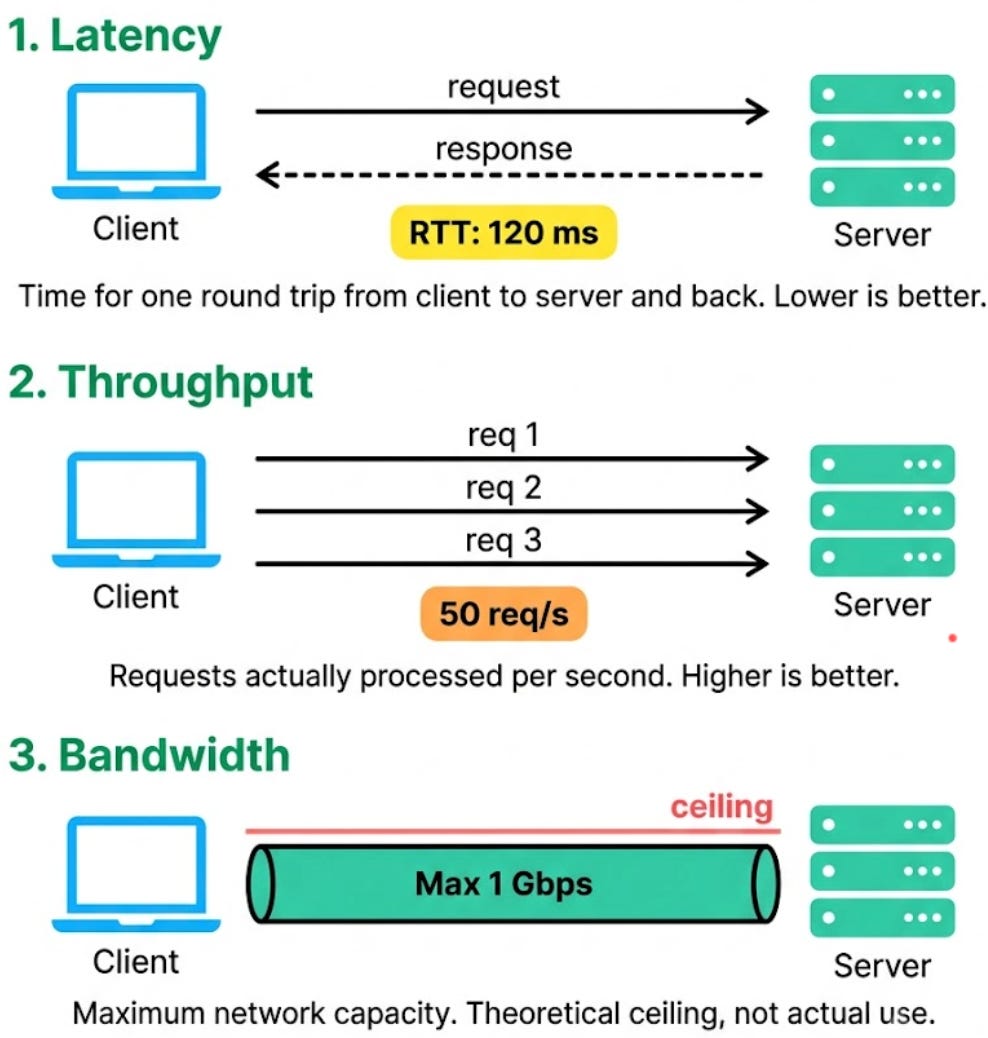
More bandwidth does not always reduce latency.
A 1 Gbps connection can still feel slow if the server is on the other side of the world.
In system design:
Caches and CDNs reduce latency.
More servers and network capacity increase bandwidth.
Compression, fewer round trips, and better protocols improve throughput.
Good systems optimize all three, but they are not the same thing.
Thank you for reading!
Networking in theory: smooth communication.
Networking in practice: “why is this not connecting right now?”
Great breakdown, this is exactly the kind of stuff that's easy to read about but hard to actually visualize. for anyone wanting to poke at this hands on, running a DNS lookup on a domain you know (like google.com) and comparing the A record, MX record, and TTL values against what the article describes really helps it click. Same with IP addresses, looking up a random public IP and seeing what info is tied to it (ISP, rough location, whether it's flagged as a VPN/proxy) makes the addressing section feel a lot more concrete than just reading the theory. Apifreaks.com has free dns lookup and IP lookup tools if anyone wants to try this out; they've also got a bunch of other networking/domain-related APIs bundled in if you end up needing more than the basics.
This newsletter keeps getting better btw, the illustrations make these topics so much easier to follow