

Kafka vs RabbitMQ vs SQS

Most backend systems eventually need one service to hand off work to another asynchronously. For example: A payment service may need to send receipts, or an order service may need to trigger fulfillment.
That is where messaging systems come in. They sit between producers and consumers, buffer work, decouple services, and let each side scale independently.
But choosing a messaging system is not always obvious. Kafka, RabbitMQ, and Amazon SQS are populars solutions, but they are built for different kinds of workloads.
In this article, we’ll compare Kafka, RabbitMQ, and SQS across the key dimensions that matter when designing asynchronous systems, and explain when to choose each one.
📣 Research Agents That Find, Verify, and Explain (Sponsor)

Deep research agents should do more than find answers. They should show why those answers can be trusted.
Apodex is built for long-horizon research tasks where reliability matters. It plans the search, gathers evidence, uses tools, verifies findings, and synthesizes grounded responses.
Its verification-first design separates the solver from the verifier, using different context and tools to reduce unsupported conclusions.
Apodex recently launched Apodex 1.0, a deep research agent family built around independent verification.
This release includes:
Apodex-1.0-H, our flagship deep research model
AgentOS, a runtime for building and evaluating agent workflows
Apodex-1.0 and Apodex-mini
Open-weight Smol models at 0.8B, 2B, and 4B
Apodex is now available for researchers, scientists, developers, and builders worldwide.
Hugging Face: https://huggingface.co/collections/apodex/apodex-1
Try Apodex (early access): https://www.apodex.ai
API Platform: https://platform.apodex.ai/
Join Discord: https://discord.gg/TDJA59TCng
1. Three Different Models
Before comparing them, it helps to understand what each system fundamentally is. Most confusion comes from treating Kafka, RabbitMQ, and SQS as interchangeable queues. They are not.
Here’s the core model behind each one.
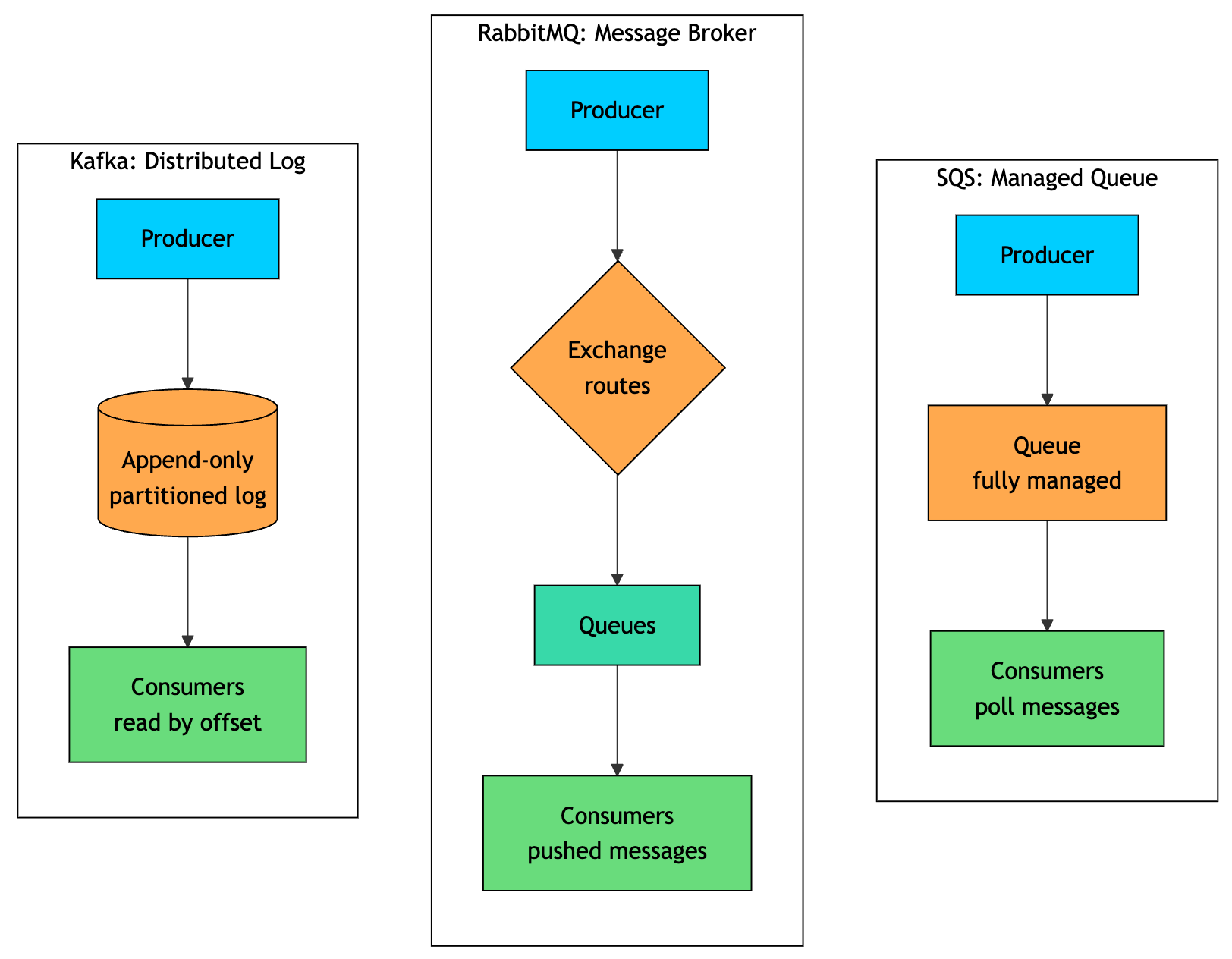
Kafka stores messages in an append-only log. Consumers track their position with offsets, and messages remain available until the retention period expires. This allows multiple consumers to read the same data independently and replay old messages when needed.
RabbitMQ works more like a traditional broker. Producers send messages to exchanges, exchanges route them to queues, and consumers receive messages from those queues. Once a consumer acknowledges a message, RabbitMQ removes it.
SQS is simpler. You send messages to a queue, consumers poll the queue, and AWS manages the infrastructure behind it.
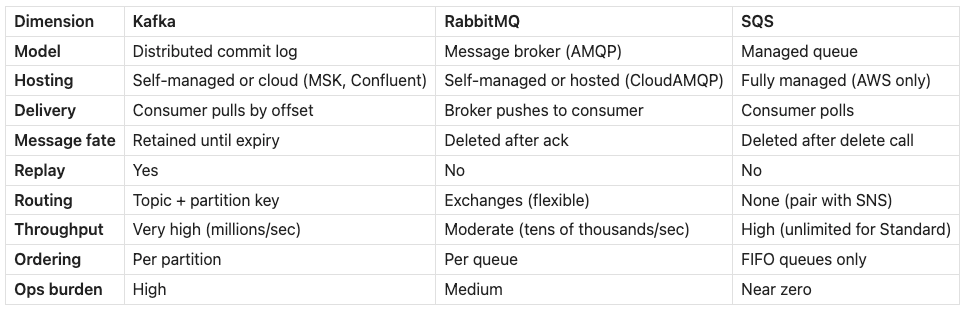
The table below summarizes how they differ across different dimensions:
2. Apache Kafka: The Distributed Log
Kafka was originally built at LinkedIn to move large volumes of activity data, such as page views, clicks, and searches, across many internal systems. Traditional message brokers were not a great fit for that scale, so Kafka took a different approach: it modeled messaging as a distributed append-only log.
The core idea is simple. Messages are appended to ordered, immutable logs. Each topic is split into partitions, and those partitions are spread across brokers for parallelism and fault tolerance.
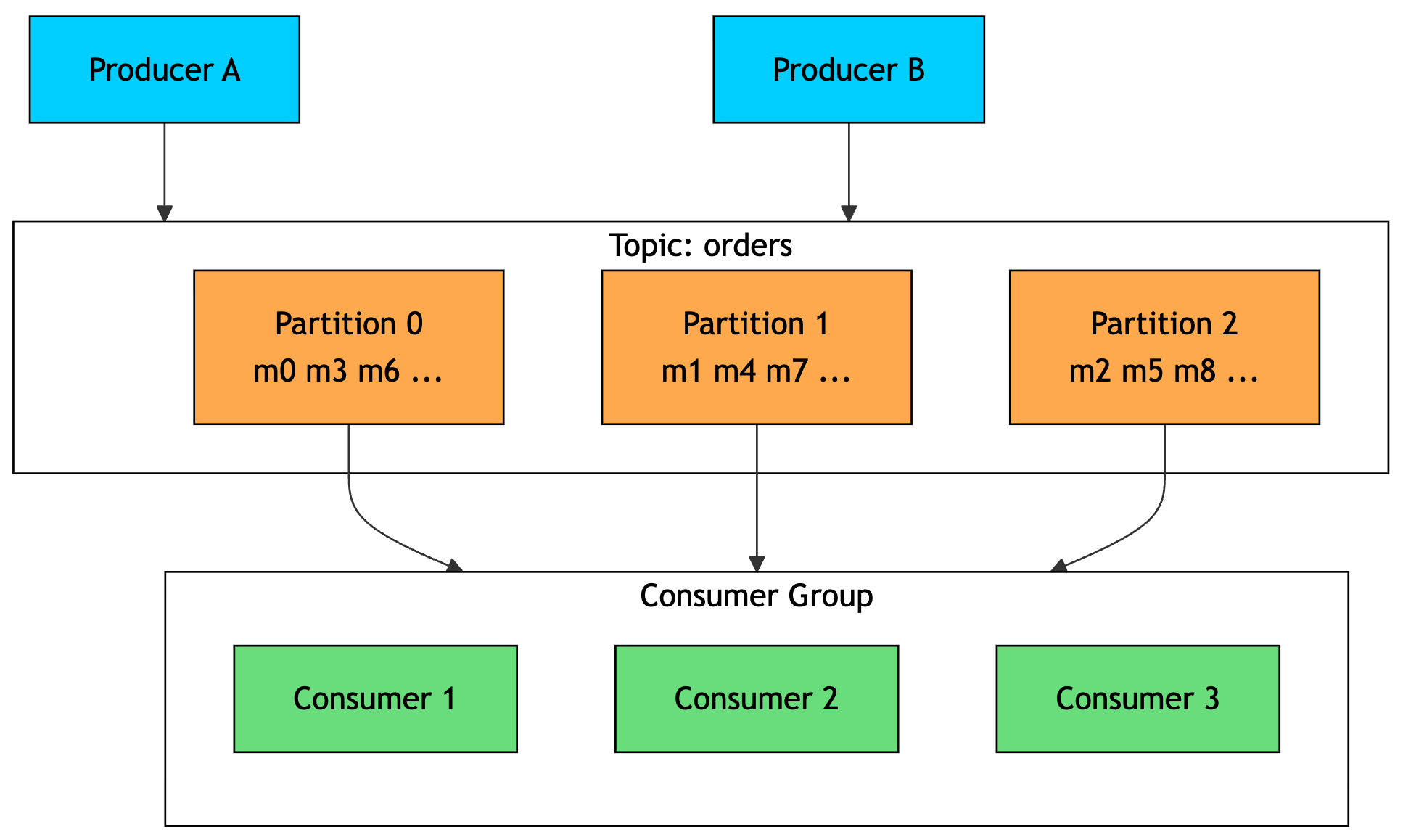
Producers write messages to a topic. A partition key decides which partition a message lands in, so related messages can stay ordered within the same partition.
Consumers read messages by offset. Kafka does not delete a message when it is read. Instead, messages stay in the log until the retention period expires. This is what makes replay possible.
Consumer groups are the main scaling mechanism. Within one consumer group, each partition is assigned to only one consumer. You can increase parallelism by adding more partitions and consumers.
If another consumer group reads the same topic, it gets its own independent view of the stream. That means the same event feed can power analytics, billing, search indexing, fraud detection, and other systems at the same time.
Kafka is fast because it is built around sequential I/O. Writes are appended to disk, reads are served efficiently from the operating system page cache, and messages are batched and compressed. This lets Kafka handle very high throughput across a cluster.
Strengths
Very high throughput on commodity hardware
Messages are retained, so consumers can replay history
Multiple independent consumer groups read the same data
A mature stream-processing ecosystem (Kafka Streams, ksqlDB, Connect)
Weaknesses
Operationally heavy to run yourself (brokers, partitions, rebalancing, and historically ZooKeeper, now KRaft)
No per-message routing logic; consumers filter on their own
No native priority queues or per-message delay
Overkill for simple task queues
Choose Kafka when you need replay, event sourcing, very high throughput, real-time stream processing, or multiple teams consuming the same event feed independently. Kafka is best when events become a long-lived stream of data, not just temporary work items.
3. RabbitMQ: The Flexible Broker
RabbitMQ is a traditional message broker built around routing and reliable delivery. While Kafka is optimized for storing and replaying large event streams, RabbitMQ is optimized for getting each message to the right consumer quickly.
The key idea is that producers do not usually publish directly to queues. They publish to an exchange. The exchange then routes each message to one or more queues using rules called bindings.
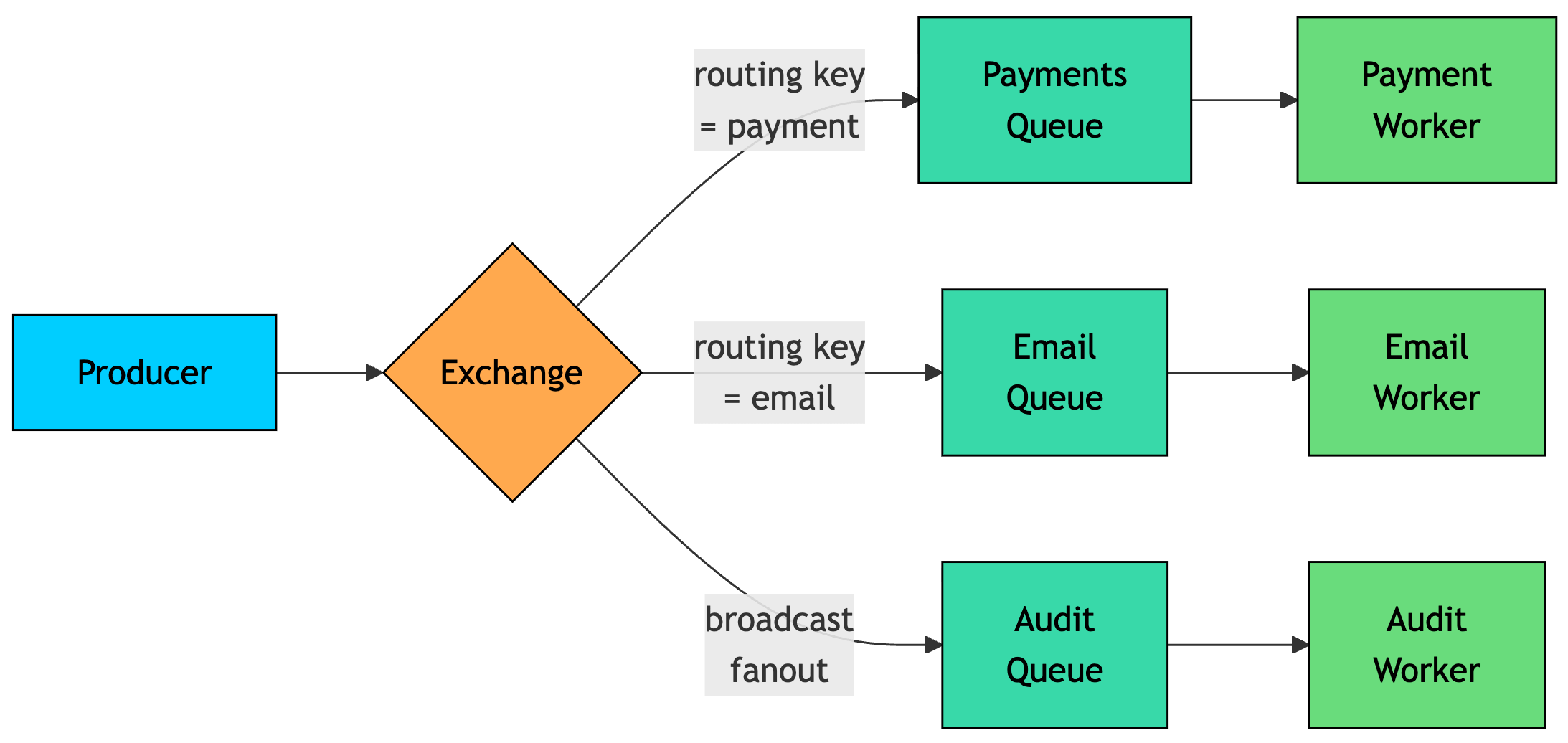
RabbitMQ supports several exchange types:
Direct: Routes by exact routing key match
Topic: Routes by pattern, such as
order.*Fanout: Broadcasts to all bound queues
Headers: Routes based on message headers
This routing model is RabbitMQ’s biggest strength. It lets you express routing rules in the broker instead of hardcoding them in every producer or consumer.
RabbitMQ delivery is push-based. The broker sends messages to consumers, and each consumer acknowledges a message after processing it. Once RabbitMQ receives the acknowledgment, it removes the message from the queue. If the consumer crashes before acknowledging, the message can be requeued and delivered again.
This push-and-ack model makes RabbitMQ a good fit for low-latency task processing, background jobs, and workflows where each message needs to reach a specific worker.
Strengths
Flexible routing through exchange types
Low per-message latency from push-based delivery
Native support for priority queues, per-message TTL, and delayed delivery (via plugin)
Multiple protocols (AMQP, MQTT, STOMP) and a built-in management UI
Weaknesses
Lower throughput than Kafka, typically tens of thousands of messages per second per node
No replay; once a message is acked, it’s gone
Throughput drops when queues grow very deep, since it’s tuned for queues that stay near empty
Clustering and mirrored/quorum queues add operational complexity
Choose RabbitMQ when you need flexible routing, priority queues, request-reply patterns, per-message delays, or low latency for individual messages. It is a strong fit when the main problem is getting each message to the right worker quickly and reliably.
Kafka and RabbitMQ both require you to think about brokers, capacity, scaling, and operations. SQS takes a different approach by making the queue fully managed.
4. Amazon SQS: The Managed Queue
Amazon SQS is the simplest of the three. It gives up Kafka’s replay model and RabbitMQ’s rich routing in exchange for one major benefit: almost no operational work.
There are no brokers to provision, no clusters to size, and no replication settings to manage. You create a queue, send messages to it, and AWS handles the infrastructure behind it.
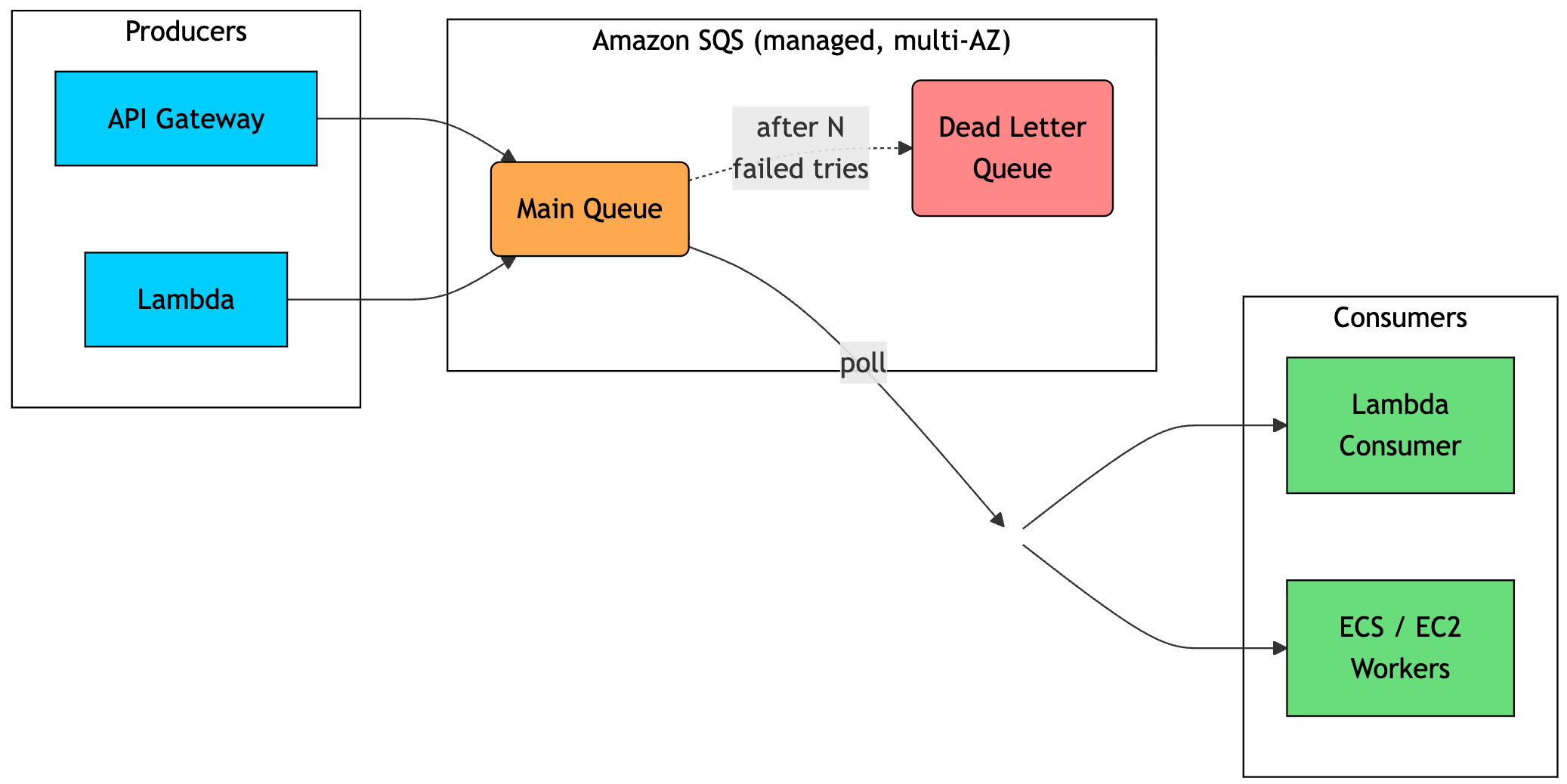
The flow is straightforward. Producers send messages to a queue. Consumers poll the queue for messages. AWS manages durability, scaling, and availability.
The important concept is the visibility timeout. When a consumer receives a message, SQS does not delete it immediately. Instead, it hides the message from other consumers for a configured period. The consumer processes the message and then explicitly deletes it.
If the consumer crashes before deleting the message, the visibility timeout expires and the message becomes available again. Another consumer can then pick it up. After a configured number of failed attempts, the message can be moved to a dead-letter queue for later inspection.
SQS has two main queue types:
Standard queue: Very high throughput, at-least-once delivery, best-effort ordering
FIFO queue: Preserves order within a message group and supports deduplication, but with lower throughput
Strengths
No infrastructure to manage (AWS manages it for you)
Scales automatically and absorbs traffic spikes
Deep AWS integration (Works well with Lambda, SNS, S3, CloudWatch, and other services)
Pay-per-request pricing with no idle cost
Weaknesses
AWS-only; no portability to other clouds or on-premise
No replay and 14-day maximum retention
No built-in routing (you pair it with SNS for fan-out)
256 KB message size limit, and FIFO throughput is capped
Choose SQS when you are building on AWS and want a reliable queue with almost no operational overhead. It is ideal for serverless workflows, bursty background jobs, and simple asynchronous processing where you do not need replay or advanced routing.
5. Using Them Together
Kafka, RabbitMQ, and SQS are not mutually exclusive. Mature systems often use more than one because they solve different problems.
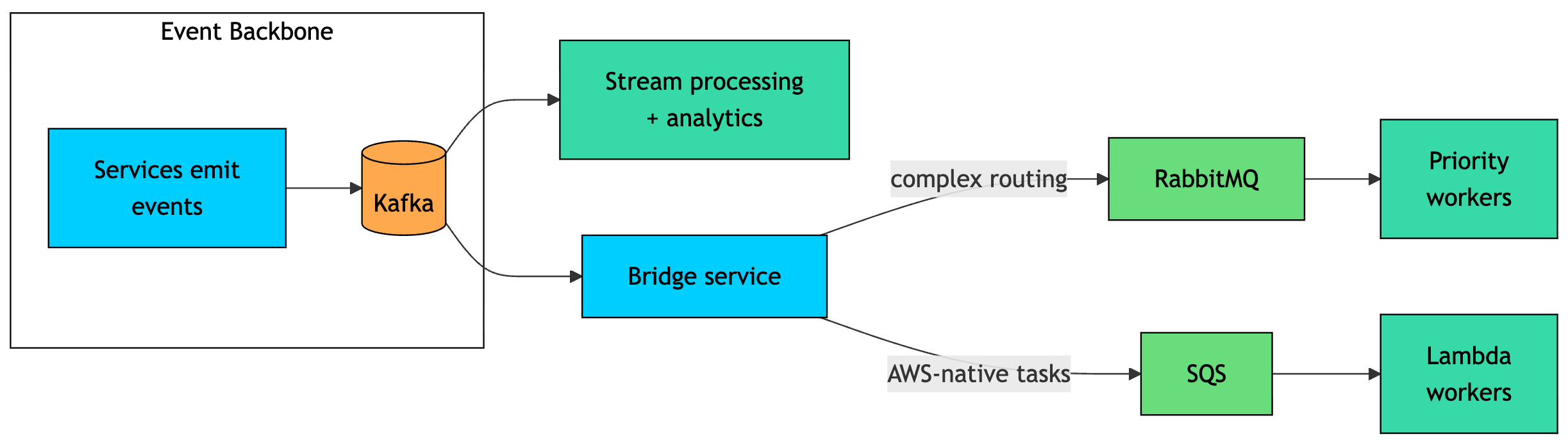
A common pattern is to use Kafka as the central event backbone. Services publish high-volume events to Kafka, and downstream systems consume those events for analytics, stream processing, search indexing, billing, or auditing.
From there, a bridge service can forward selected events to a task queue. Use RabbitMQ when the work needs flexible routing, priority handling, or dedicated worker pools. Use SQS when the work is AWS-native and you want services like Lambda, ECS, or EC2 workers to process it with minimal operations.
This split plays to each system’s strengths. Kafka handles durable, replayable, high-throughput event streams. RabbitMQ and SQS handle short-lived task processing, where messages represent work that disappears once completed.
Thank you for reading!
If you found it valuable, hit a like ❤️ and consider subscribing for more such content every week.
If you have any questions/suggestions, feel free to leave a comment