How I'd Scale a System from 0 to 10 million+ Users
Scaling is a complex topic, but after working at big tech on services handling millions of requests and scaling my own startup (AlgoMaster.io) from scratch, I’ve realized that most systems evolve through a surprisingly similar set of stages as they grow.
The key insight is that you should not over-engineer from the start. Start simple, identify bottlenecks, and scale incrementally.
In this article, I’ll walk you through 7 stages of scaling a system from zero to 10 million users and beyond. Each stage addresses the specific bottlenecks that show up at different growth points. You’ll learn what to add, when to add it, why it helps, and the trade-offs involved.
Whether you’re building an app or website, preparing for system design interviews, or just curious about how large-scale systems work, understanding this progression will sharpen they way you think about architecture.
Note: The user ranges in this article are rough guidelines. The exact thresholds will vary based on your product, workload, and traffic patterns.
Stage 1: Single Server (0-100 Users)
When you’re just starting out, your first priority is simple: ship something and validate your idea. Optimizing too early at this stage wastes time and money on problems you may never face.
The simplest architecture puts everything on a single server: your web application, database, and any background jobs all running on the same machine.
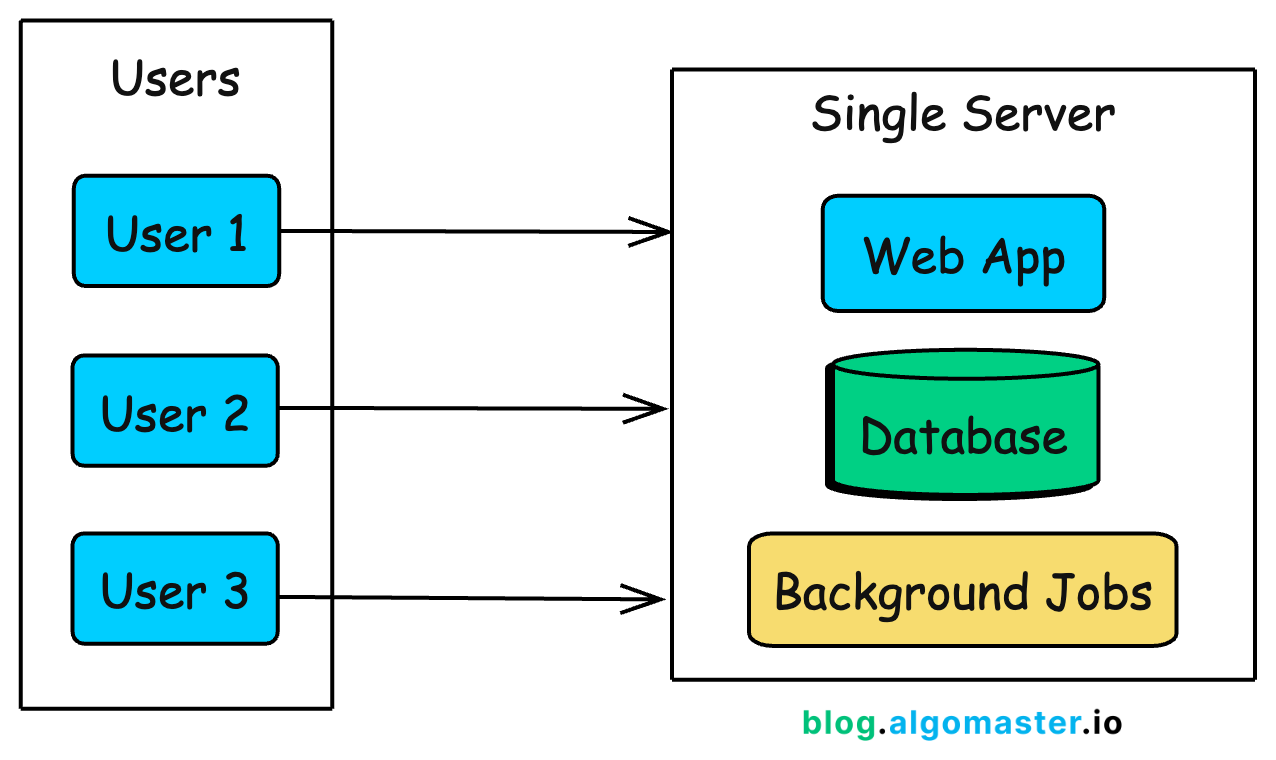
This is how Instagram started. When Kevin Systrom and Mike Krieger launched the first version in 2010, 25,000 people signed up on day one.
They didn’t over-engineer upfront. With a small team and a simple setup, they scaled in response to real demand, adding capacity as usage grew, rather than building for hypothetical future traffic.
What This Architecture Looks Like
In practice, a single-server setup means:
A web framework (Django, Rails, Express, Spring Boot) handling HTTP requests
A database (PostgreSQL, MySQL) storing your data
Background job processing (Sidekiq, Celery) for async tasks
Maybe a reverse proxy (Nginx) in front for SSL termination
All of these run on one virtual machine. Your cloud provider bill might be $20-50/month for a basic VPS (DigitalOcean Droplet, AWS Lightsail, Linode).
Why This Works for Early Stage
At this stage, simplicity is your biggest advantage:
Fast deployment: One server means one place to deploy, monitor, and debug.
Low cost: A single $20-50/month Virtual Private Server (VPS) can comfortably handle your first 100 users.
Faster iteration: No distributed systems complexity to slow down development.
Easier debugging: All logs are in one place, and there are no network issues between components.
Full-stack visibility: You can trace every request end to end because there’s only one execution path.
The Trade-offs You’re Making
This simplicity comes with trade-offs you accept knowingly:
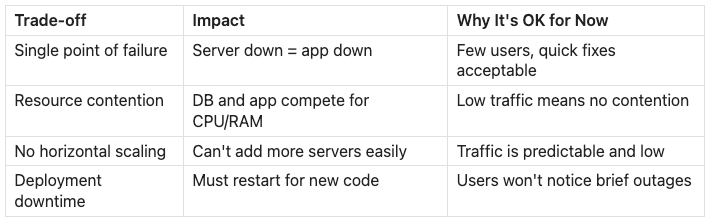
When to Move On
You’ll know it’s time to evolve when you notice these signs:
Database queries slow down during peak traffic: The app and database compete for the same CPU and memory. One heavy query can drag down API latency for everyone.
Server CPU or memory consistently exceeds 70-80%: You’re approaching the limits of what a single machine can reliably handle.
Deployments require restarts and cause downtime: Even short interruptions become noticeable, and users start to complain.
A background job crash takes down the web server: Without isolation, non-user-facing work can impact the user experience.
You can’t afford even brief downtime: Your product has become critical enough that even maintenance windows stop being acceptable.
At some point, the server starts to struggle under the weight of doing everything. That’s when it’s time for your first architectural split.
Stage 2: Separate Database (100-1K Users)
As traffic grows, your single server starts struggling. The web application and database compete for the same CPU, memory, and disk I/O. A single heavy query can spike latency and slow down every API response.
The first scaling step is simple: separate the database from the application server.
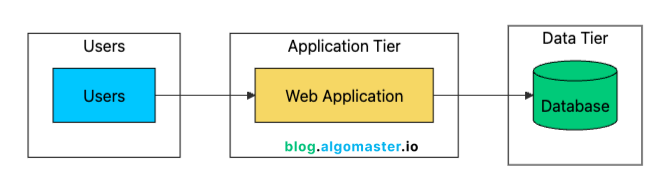
This two-tier architecture gives you several immediate benefits:
Resource Isolation: Application and database no longer compete for CPU/memory. Each can use 100% of their allocated resources.
Independent Scaling: Upgrade the database (more RAM, faster storage) without touching the app server.
Better Security: Database server can sit in a private network, not exposed to the internet.
Specialized Optimization: Tune each server for its specific workload. High CPU for app server, high I/O for database.
Backup Simplicity: Database backups don’t affect application performance since they run on a different machine.
Managed Database Services
At this stage, most teams use a managed database like Amazon RDS, Google Cloud SQL, Azure Database, or Supabase (I use Supabase at algomaster.io).
Managed services typically handle:
Automated backups (daily snapshots, point-in-time recovery)
Security patches and updates
Basic monitoring and alerts
Optional read replicas (we’ll cover these later)
Failover to standby instances
The cost difference between self-hosting and managed is usually small once you factor in engineering time. A managed PostgreSQL instance might cost $50–$100/month more than a raw VM, but it can save hours of maintenance every week. Those hours are better spent shipping features.
The main reasons to self-manage a database are:
Cost optimization at very large scale
Specific configurations that managed services don’t support
Compliance requirements that prohibit managed services
You’re building a database product
For most teams, managed services are the right choice until your database bill grows into the thousands of dollars per month.
Connection Pooling
One often-overlooked improvement at this stage is connection pooling. Each database connection consumes resources:
Memory for the connection state (typically 5-10MB per connection in PostgreSQL)
File descriptors on both app and database servers
CPU overhead for connection management
Opening a new connection is expensive too. Between the TCP handshake, SSL negotiation, and database authentication, you can add 50–100 ms of overhead per request.
A connection pooler like PgBouncer (for PostgreSQL) keeps a small set of database connections open and reuses them across requests.
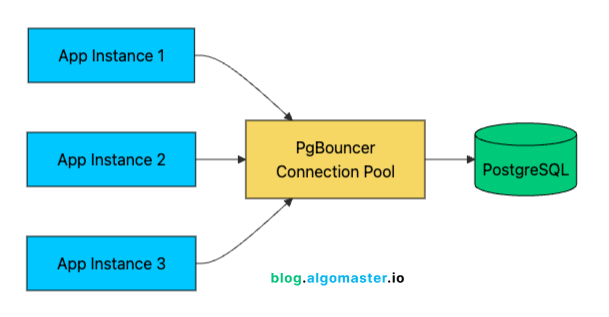
With 1,000 users, you might have 100 concurrent connections hitting your API. Without pooling, that’s 100 database connections consuming resources. With pooling, 20-30 actual database connections can efficiently serve those 100 application connections through connection reuse.
Connection pooling modes:
Session pooling: One pool connection per client connection (most compatible, least efficient)
Transaction pooling: Connection returned to the pool after each transaction (best balance for most apps)
Statement pooling: Connection returned after each statement (most efficient, but can break features)
Most applications work best with transaction pooling, which often improves connection efficiency by 3–5x.
Network Latency Considerations
Separating the database introduces network latency. When app and database were on the same machine, “network” latency was essentially zero (loopback interface). Now every query adds 0.1-1ms of network round-trip time.
For most applications, this is negligible. But if your code makes hundreds of database queries per request (an anti-pattern, but common), this latency adds up. The solution isn’t to put them back on the same machine, but to optimize your query patterns:
Batch queries where possible
Use JOINs instead of N+1 query patterns
Cache frequently accessed data
Use connection pooling to avoid repeated connection setup overhead
With the database on its own server, you’ve bought yourself room to grow. But you’ve also created a new single point of failure: the application server is now the weak link. What happens when it goes down, or when it simply can’t keep up with demand?
Stage 3: Load Balancer + Horizontal Scaling (1K-10K Users)
Your separated architecture handles load better now, but you’ve introduced a new problem: your single application server is now a single point of failure. If it crashes, your entire application goes down. And as traffic grows, that one server can’t keep up.
The next step is to run multiple application servers behind a load balancer.
The load balancer sits in front of your servers and distributes incoming requests across them. If one server fails, the load balancer detects this (via health checks) and routes traffic only to healthy servers. Users experience no downtime when a single server fails.
The load balancer needs to decide which server handles each request. Common algorithms include: Round Robin, Weighted Round Robin, Least Connections, IP Hash, and Random.
Most teams start with Round Robin (simple, works well for most cases) and switch to Least Connections if they have requests with varying processing times.
Modern load balancers operate at different layers:
Layer 4 (Transport): Routes based on IP and port. Fast, but can’t inspect HTTP headers.
Layer 7 (Application): Routes based on HTTP headers, URLs, cookies. More flexible, slightly more overhead.
For most web applications, Layer 7 load balancing is preferable because it enables:
Path-based routing (
/api/*to API servers,/static/*to CDN)Header-based routing (different versions for mobile vs desktop)
SSL termination at the load balancer
Request/response inspection for security
Vertical vs Horizontal Scaling
Before adding more servers, you might ask: why not just get a bigger server? This is the classic vertical vs horizontal scaling trade-off.
Vertical scaling means moving to a larger server. It works well early on and usually requires no code changes. But you eventually run into two problems: hard hardware limits and rapidly increasing costs.
Bigger machines are priced non-linearly, so doubling CPU or memory can cost 3–4x more. And even the largest instances have a ceiling.
Horizontal scaling means adding more servers. It is harder at first because your application must be stateless, so any server can handle any request. But it gives you effectively unlimited capacity and built-in redundancy. If one server fails, the system keeps running.
The Session Problem
This is where horizontal scaling gets tricky. If a user logs in and their session lives in Server 1’s memory, what happens when the next request lands on Server 2? From the app’s perspective, the session is missing, so the user looks logged out.
This is the stateful server problem, and it’s the biggest obstacle to horizontal scaling.
There are two common ways to handle it:
1. Sticky Sessions (Session Affinity)
The load balancer routes all requests from the same user to the same server, typically using a cookie or IP hash.
Pros:
Requires no application changes
Works with any session storage
Cons:
If that server fails, the user loses their session
Uneven load distribution if some users are more active than others
Limits true horizontal scaling (can’t freely move users between servers)
New servers take time to “warm up” with sessions
2. External Session Store
Move session data out of the application servers into a shared store like Redis or Memcached.
Now any server can handle any request because session data is centralized. This is the pattern most large-scale systems use. The added latency of a Redis lookup (sub-millisecond) is negligible compared to the flexibility it provides.
You can now handle more traffic and survive server failures. But as your user base grows, you’ll notice something: no matter how many application servers you add, they’re all hammering the same database. The database is becoming your next bottleneck.
Stage 4: Caching + Read Replicas + CDN (10K-100K Users)
With 10,000+ users, a new bottleneck emerges: your database. Every request hits the database, and as traffic grows, query latency increases. The database that handled 100 QPS (queries per second) fine starts struggling at 1,000 QPS.
Read-heavy applications (which most are, with read-to-write ratios of 10:1 or higher) suffer especially hard.
This stage introduces three complementary solutions: caching, read replicas, and CDNs. Together, they can reduce database load by 90% or more.
Caching Layer
Most web applications follow the 80/20 rule: 80% of requests access 20% of the data. A product page viewed 10,000 times doesn’t need 10,000 database queries. The user’s profile that loads on every page view doesn’t need to be fetched fresh each time.
Caching stores frequently accessed data in memory for near-instant retrieval. While database queries take 1-100ms, cache reads take 0.1-1ms.
The most common caching pattern is cache-aside (also called lazy loading):
Application checks the cache first
If data exists (cache hit), return it immediately
If not (cache miss), query the database
Store the result in cache for future requests (with TTL)
Return the data
Redis and Memcached are the standard choices here. Redis is more feature-rich (supports data structures like lists, sets, sorted sets; persistence; pub/sub; Lua scripting), while Memcached is simpler and slightly faster for pure key-value caching.
Most teams choose Redis because the additional features are useful (using sorted sets for leaderboards, lists for queues, etc.), and the performance difference is negligible.
What to Cache
Not everything should be cached. Good cache candidates include:
Poor cache candidates:
Highly personalized data (different for every user, low reuse)
Frequently changing data (constant invalidation overhead)
Large blobs (consumes memory without proportional benefit)
Transactional data where staleness causes issues
Cache Invalidation
The hardest part of caching isn’t adding it, it’s keeping it accurate. When underlying data changes, cached data becomes stale. This is famously one of the “two hard problems in computer science.”
Common strategies include:
Most systems start with TTL-based expiration (set cache to expire after 5-60 minutes) and add explicit invalidation for data where staleness causes problems. For example:
def update_user_profile(user_id, new_data):
# Update database
db.update("users", user_id, new_data)
# Invalidate cache
cache.delete(f"user:{user_id}")The next read will miss the cache and fetch fresh data from the database.
Read Replicas
Even with caching, some requests will still hit the database, especially writes and cache misses. Read replicas help by distributing read traffic across multiple copies of the database.
The primary database handles all writes. Changes are then replicated (usually asynchronously) to one or more read replicas. Your application sends read queries to replicas and keeps the write workload on the primary, which reduces contention and improves overall throughput.
Replication Lag
One important consideration is replication lag. Since replication is often asynchronous (for performance), replicas might be milliseconds to seconds behind the primary.
For most applications, this is acceptable. If a social media feed is a second behind, most users will not notice. But some flows require stronger consistency.
A common failure mode is read-your-writes consistency:
A user updates their profile and refreshes immediately. If that read lands on a replica that has not caught up, they see old data and assume the update failed.
Solutions:
Read from primary after writes: For a short window (N seconds) after a write, route that user’s reads to the primary.
Session-level consistency: Track the user’s last write timestamp and only read from replicas that have caught up past that point.
Explicit read-from-primary: For critical reads (viewing just-updated data), always hit the primary.
Most frameworks have built-in support for read/write splitting. For example, Rails (ActiveRecord), Django, and Hibernate can route reads to replicas and writes to the primary automatically.
Content Delivery Network (CDN)
Static assets like images, CSS, JavaScript, and videos rarely change and don’t need to hit your application servers at all. They’re also the largest files you serve, which makes them expensive in both bandwidth and compute if you serve them directly.
A CDN solves this by caching static assets on globally distributed servers called edge locations (or points of presence).
Here’s what happens when a user in Tokyo requests an image:
The request is routed to the CDN edge in Tokyo (low latency, say ~50 ms round trip).
If the file is already cached (cache hit), the CDN serves it immediately.
If it’s not cached (cache miss), the CDN fetches it from your origin (maybe in the US, ~300 ms), stores a copy at the edge, and then returns it to the user.
The next user in Tokyo gets the cached version from the edge, again at ~50 ms.
Popular CDNs include Cloudflare (strong free tier), AWS CloudFront, Fastly, and Akamai.
With caching, read replicas, and a CDN in place, your system can handle steady growth. The next challenge is spiky traffic. A viral post, a marketing campaign, or even the difference between 3 AM and 3 PM can create 10x traffic variation. At that point, manually adjusting capacity stops working.
Stage 5: Auto-Scaling + Stateless Design (100K-500K Users)
At 100K+ users, traffic patterns become less predictable. You might have:
Daily peaks (morning in US, evening in EU)
Weekly patterns (higher on weekdays for B2B, weekends for consumer)
Marketing campaign spikes (10x traffic for hours)
Viral moments (100x traffic, unpredictable duration)
At this point, manually adding and removing servers is no longer viable. You need infrastructure that reacts automatically.
This stage focuses on auto-scaling (automatically adjusting capacity) and ensuring your application is truly stateless (servers can be added or removed freely without data loss or user impact).
Stateless Architecture
For auto-scaling to work, your application servers must be interchangeable. Any request can go to any server. Any server can be terminated without losing data. A new server can start handling requests immediately.
When a new server joins the cluster, it typically:
Starts the application
Registers with the load balancer (or gets discovered)
Connects to Redis, database, and other shared services
Immediately starts handling requests
When a server is removed:
Load balancer stops sending new requests
In-flight requests complete (graceful shutdown)
Server terminates
No data is lost, because nothing important is stored locally.
Auto-Scaling Strategies
Auto-scaling adjusts capacity based on metrics. The scaling system continuously monitors metrics and adds or removes servers based on thresholds.
Most teams start with CPU-based scaling. It’s simple, works for most workloads, and is easy to reason about. Add queue-depth scaling for background job workers.
Scaling Parameters
When configuring auto-scaling, you’ll set these parameters:
Minimum instances: 2 # Always running, even at zero traffic
Maximum instances: 20 # Cost ceiling and resource limit
Scale-up threshold: 70% # CPU percentage to trigger scale-up
Scale-down threshold: 30% # CPU percentage to trigger scale-down
Scale-up cooldown: 3 min # Wait time after scaling up before next action
Scale-down cooldown: 10 min # Wait time after scaling down
Instance warmup: 2 min # Time for new instance to become fully operationalImportant considerations:
Minimum instances: Should be at least 2 for redundancy. If one fails, the other handles traffic while a replacement spins up.
Cooldown periods: Prevent thrashing (rapidly scaling up and down). Scale-down cooldown is typically longer because removing capacity is riskier than adding it.
Instance warmup: New servers need time to start, load code, warm up caches, establish database connections. Don’t count them toward capacity until they’re ready.
Asymmetric scaling: Scale up aggressively (react quickly to load), scale down conservatively (don’t remove capacity too soon).
JWT for Stateless Authentication
At this scale, many teams move from session-based to token-based authentication using JWTs (JSON Web Tokens). With session-based auth, every request requires a session store lookup. With JWTs, authentication state is contained in the token itself.
A JWT has three parts:
Header.Payload.Signature
eyJhbGciOiJIUzI1NiJ9.eyJ1c2VyX2lkIjoxMjM0NTZ9.signature_hereThe payload contains claims like user ID, roles, and expiration. The signature ensures the token wasn’t tampered with. Any server can verify the signature using a shared secret key without querying a database.
Trade-offs with JWTs:
Pro: Truly stateless, no session store lookup for every request
Pro: Works across services (microservices, mobile apps, third-party APIs)
Con: Can’t invalidate individual tokens before expiry (user logs out, but token remains valid)
Con: Token size adds to each request (500 bytes vs 32-byte session ID)
A common pattern is short-lived access tokens (for example, 15 minutes) plus long-lived refresh tokens (for example, 7 days). That limits how long a compromised or stale token can be used.
At this point, your application tier scales elastically. Traffic spikes and more servers spin up. Traffic drops and they spin down.
But a new ceiling is coming: the database can only handle so many writes, the monolith becomes harder to change safely, and some operations are too slow to run synchronously. That’s when you bring in the heavy machinery.
Stage 6: Sharding + Microservices + Message Queues (500K-1M Users)
With 500K+ users, you’ll hit new ceilings that the previous optimizations can’t solve:
Writes overwhelm a single primary database, even if reads are offloaded to replicas.
The monolith becomes painful to ship. A small change to notifications forces a full redeploy of the entire application.
Previously fast operations start taking seconds because too much work is happening synchronously in the request path.
Different parts of the product need different scaling profiles. Search and feeds may need 10x the capacity of profile pages.
This is where the heavy machinery comes in: database sharding, microservices, and asynchronous processing (message queues).
Database Sharding
Read replicas solved read scaling, but writes all still go to one primary database. At high volume, this primary becomes the bottleneck. You’re limited by what one machine can handle in terms of:
Write throughput (inserts, updates, deletes)
Storage capacity (even big disks have limits)
Connection count (even with pooling)
Sharding splits your data across multiple databases based on a shard key. Each shard holds a subset of the data and handles both reads and writes for that subset.
Sharding Strategies
Consistent hashing is a popular improvement over simple hash-based sharding. Instead of
hash(key) % num_shards, you place keys on a ring. When you add a new shard, only keys adjacent to its position move, not all keys. This means adding a fourth shard moves ~25% of data instead of ~75%.
When to Shard
Sharding is a one-way door. Once you shard:
Cross-shard queries become expensive or impossible (joining data across shards)
Transactions spanning shards are complex (two-phase commit or give up on atomicity)
Schema changes must be applied to all shards
Operations (backups, migrations) multiply by shard count
Application code becomes more complex (shard routing logic)
Before sharding, exhaust these options:
Optimize queries: Add missing indexes, rewrite slow queries, denormalize where helpful
Vertical scaling: Upgrade to a bigger database server (more CPU, RAM, faster SSDs)
Read replicas: If read-heavy, add replicas to handle reads
Caching: Reduce load on database by caching frequently accessed data
Archival: Move old data to cold storage (separate database, object storage)
Connection pooling: Reduce connection overhead
Only shard when you’re truly write-bound and a single node physically cannot handle your throughput, or when your dataset exceeds what fits on one machine.
Microservices
As the product and team grow, a monolith becomes harder to evolve safely. Common signals you might benefit from microservices:
A change to one area (like notifications) requires redeploying the entire app.
Teams can’t ship independently without coordinating every release.
Different parts of the app have different scaling needs (search needs 10 servers, profile viewing needs 2)
Engineers frequently conflict in the same codebase.
A bug in one subsystem takes down the whole application.
Microservices split the application into independent services that communicate over the network.
Each service:
Owns its data (a database only it writes to directly)
Deploys independently (ship notifications without touching checkout)
Scales independently (search can scale separately from profiles)
Uses fit-for-purpose tech (search might use Elasticsearch, payments might need Postgres with strong consistency)
Exposes a clear API contract (other services integrate via stable endpoints)
The trade-off is a big jump in operational complexity. The safest approach is to start with one extraction: pick the service with the cleanest boundaries and the clearest independent scaling needs. Avoid splitting into dozens of services upfront.
Message Queues and Async Processing
Not everything needs to happen synchronously in the request path. When a user places an order, some steps must complete immediately, while others can happen in the background.
Must be synchronous:
Validate payment method
Check inventory
Create order record
Return order confirmation
Can be asynchronous:
Send confirmation email
Update analytics dashboard
Notify warehouse for fulfillment
Update recommendation engine
Sync to accounting system
Message queues like Kafka, RabbitMQ, or SQS decouple producers from consumers. The order service publishes an event like OrderPlaced, and downstream systems consume it independently.
Benefits of async processing:
Resilience: If email service is down, messages queue up. Order still completes. Email sends when service recovers.
Scalability: Consumers scale independently based on queue depth. Holiday rush? Add more warehouse notification processors without touching the orders service.
Decoupling: The order service doesn’t need to know who consumes the event. You can add a new consumer (fraud detection, CRM sync) without changing the producer.
Smoothing bursts: Queues absorb spikes and let downstream systems process at a sustainable rate instead of getting overloaded.
Retry handling: Failed messages can be retried automatically. Dead letter queues capture messages that fail repeatedly for investigation.
A common real-world pattern is “do the write now, do the heavy work later.”
For example, in social apps, creating a post is usually a fast write and an immediate success response. Expensive work like fan-out, indexing, notifications, and feed updates happens asynchronously, which is why you sometimes see small delays in like counts or feed propagation.
At this point, your architecture can handle massive scale within a single region. But your users aren’t all in one place, and neither should your infrastructure be.
Once you have users across continents, latency becomes noticeable, and a single datacenter becomes a single point of failure for your entire global user base.
Stage 7: Multi-Region + Advanced Patterns (1M-10M+ Users)
With millions of users worldwide, new challenges emerge:
Users in Australia experience 300ms latency hitting US servers
A datacenter outage (fire, network partition, cloud provider issue) takes down your entire service
Your database schema can’t efficiently serve both write-heavy real-time updates and read-heavy analytics dashboards
Different regions have different data residency requirements (GDPR in EU, data localization laws)
This stage covers multi-region deployment, advanced caching, and specialized patterns like CQRS.
Multi-Region Architecture
Deploying to multiple geographic regions achieves two main goals:
Lower latency: Users connect to nearby servers. Tokyo users hit Tokyo servers (20ms) instead of US servers (200ms).
Disaster recovery: If one region fails, others continue serving traffic. True high availability.
There are two main approaches:
Active-Passive (Primary-Secondary)
One region (primary) handles all writes. Other regions serve reads and can take over if the primary fails.
Pros:
Simpler to implement
No write conflict resolution needed
Strong consistency for writes
Cons:
Higher write latency for users far from primary
Failover isn’t instantaneous (DNS propagation, replica promotion)
Primary region is still a single point of failure
Active-Active
All regions handle both reads and writes. This requires solving the hard problem: what happens when users in US and EU update the same record simultaneously?
Pros:
Lowest possible latency for all operations
True high availability, any region failure is seamless
No single point of failure
Cons:
Conflict resolution is complex (and can cause data issues if done wrong)
Eventually consistent, not suitable for all data types
More complex to reason about and debug
Most companies start with active-passive. Active-active requires solving distributed consensus problems and accepting eventual consistency.
CAP Theorem at Global Scale
The CAP theorem becomes very real at global scale. It states that a distributed system can only provide two of three guarantees:
Consistency: Every read receives the most recent write
Availability: Every request receives a response (not an error)
Partition Tolerance: System continues despite network partitions
Since network partitions between regions are inevitable (undersea cables get cut, cloud providers have outages), you’re really choosing between consistency and availability during a partition.
Most global systems choose eventual consistency for most operations:
A user’s post might take 1-2 seconds to appear for followers in other regions
A product rating might show slightly different averages in different regions briefly
User profile updates might take a moment to propagate
Only operations where inconsistency causes real problems (payments, inventory decrements, financial transactions) require strong consistency, and those might route to a primary region.
CQRS Pattern
As systems grow, read and write patterns diverge significantly:
Writes need transactions, validation, normalized data, audit logs
Reads need denormalized data, fast aggregations, full-text search
Write volume might be 1/100th of read volume
CQRS (Command Query Responsibility Segregation) separates these concerns entirely.
The write side uses a normalized schema optimized for data integrity and transactional guarantees. The read side uses denormalized views optimized for query performance. Events synchronize the two.
Real-world example: Twitter’s timeline architecture.
Write path: When you tweet, it’s written to a normalized tweets table with proper indexing, constraints, and transactions.
Event: A “tweet created” event fires.
Projection: A fan-out service reads the event and adds the tweet to each follower’s timeline (a denormalized, per-user data structure optimized for “show me my feed” queries).
Read path: When you open Twitter, you read from your pre-computed timeline, not a complex query joining tweets, follows, and users.
CQRS adds complexity but enables:
Independent scaling of read and write paths
Optimized schemas for each access pattern
Different technology choices (PostgreSQL for writes, Elasticsearch for reads)
Better performance for both operations
Advanced Caching Patterns
At global scale, caching becomes more sophisticated:
Multi-Tier Caching
Cache Warming
When a new cache server starts (or cache expires after maintenance), the first requests face cache misses, causing latency spikes and origin load. Cache warming pre-populates caches before traffic arrives:
On deployment: Load popular items into cache during startup, before receiving traffic
Before campaigns: Before a marketing push, warm caches with products/pages likely to be accessed
Cache replication: When adding a new cache node, copy state from existing nodes
Netflix pre-warms edge caches with popular content before peak hours. When evening viewing starts, the most-watched shows are already cached at edge locations.
Write-Behind (Write-Back) Caching
For write-heavy workloads, write to cache first and asynchronously persist to database:
Write goes to cache (immediate return to user)
Cache acknowledges write
Background process flushes writes to database periodically
This reduces write latency dramatically but introduces risk: if the cache fails before flushing, writes are lost. Use only when:
Some data loss is acceptable (analytics counters, view counts)
Cache is highly available (Redis with replication and persistence)
Durability can be sacrificed for performance
You’ve now built a globally distributed system that handles millions of users with low latency worldwide. But the journey doesn’t end here. At truly massive scale, even the best off-the-shelf solutions start showing their limits.
Beyond 10 Million Users
At 10 million users and beyond, you enter territory where off-the-shelf solutions don’t always work. Companies at this scale often build custom infrastructure tailored to their specific access patterns. The problems become unique to your workload.
Specialized Data Stores
No single database handles all access patterns well. The concept of “polyglot persistence” means using different databases for different use cases:
Each database is optimized for specific access patterns. Using PostgreSQL for time-series data works but is inefficient. Using Elasticsearch for transactions is possible but dangerous.
Custom Solutions at Scale
At extreme scale, some companies build custom infrastructure because their requirements go beyond what general-purpose systems can deliver:
Facebook’s TAO: A custom data system for the social graph, built to meet Facebook’s latency and throughput needs at massive scale when off-the-shelf options couldn’t.
Google Spanner: A globally distributed SQL database designed to provide strong consistency across regions, combining properties that were hard to get together at the time.
Netflix’s EVCache: A large-scale caching layer built on Memcached, with additional replication, reliability, and operational tooling to support Netflix’s traffic patterns.
Discord’s storage journey: MongoDB (2015) → Cassandra (2017) → ScyllaDB (2022). Each move was driven by the limits of the previous choice, and Discord has shared detailed write-ups on the trade-offs behind those migrations.
Uber’s Schemaless: A MySQL-based storage layer designed to keep transactional semantics while scaling beyond a single MySQL setup, with operational simplicity for teams.
These aren’t options you’ll reach for initially, but they illustrate that scaling is an ongoing journey, not a destination. The architecture that works at 1 million users is rarely the one you’ll want at 100 million.
Edge Computing
The next frontier is pushing computation closer to users. Instead of all logic running in centralized data centers, edge computing runs code at CDN edge locations worldwide:
Cloudflare Workers: JavaScript/WASM at 250+ edge locations
AWS Lambda@Edge: Lambda functions at CloudFront edge
Fastly Compute@Edge: Compute at Fastly’s edge network
Deno Deploy: Globally distributed JavaScript runtime
Edge computing represents a fundamental shift: instead of “request → CDN → origin → CDN → response”, many requests become “request → edge → response” with the edge having enough compute capability to handle the logic.
Now that we’ve covered the full progression from a single server to global-scale infrastructure, an important question remains: how do you know when to take each step? Scaling too early wastes resources; scaling too late causes outages.
Summary
Scaling a system from zero to millions of users follows a predictable progression. Each stage solves problems that emerge at specific thresholds:
Key Principles to Remember
Start simple: Don’t optimize for problems you don’t have yet. A single server is fine until it isn’t.
Measure first: Identify the actual bottleneck before adding infrastructure. CPU-bound problems need different solutions than I/O-bound ones.
Stateless servers are the prerequisite: You can’t horizontally scale or auto-scale until your servers hold no local state.
Cache aggressively: Most data is read far more often than written. Caching gives you 10-100x performance improvement for read-heavy workloads.
Async when possible: Not everything needs to happen in the request path. Email sending, analytics, notifications can all be queued.
Shard reluctantly: Database sharding is a one-way door with significant complexity. Exhaust other options first.
Accept trade-offs: Perfect consistency and availability don’t coexist during network partitions. Know which operations truly need strong consistency.
Complexity has costs: Every component you add is a component that can fail, needs monitoring, requires expertise to operate.
The path to scale isn’t about implementing everything at once. It’s about understanding which problems emerge at each stage and applying the right solutions at the right time.
The best architecture is the simplest one that meets your current needs, with a clear path to evolve when those needs change.
That’s it. Thank you so much for reading!
If you found this article helpful, give it a like ❤️ and share it with others.
For more System Design related content, checkout my website algomaster.io


