The Hidden Cost of Database Indexes
“Just add an index.”
This is the most common advice when a query runs slow. And it works. Indexes can turn a 30-second query into a 30-millisecond one.
But indexes aren’t free. Every index you create comes with costs that are easy to overlook until they become a problem.
In this article, we’ll explore the hidden costs of database indexes that every developer should understand before reaching for `CREATE INDEX`.
1. The Write Performance Penalty
When you think about indexes, you probably think about SELECT queries. But every index also affects INSERT, UPDATE, and DELETE operations.
Here’s why: an index is a separate data structure (usually a B-Tree) that maintains a sorted copy of the indexed column(s) along with pointers to the actual rows. When you modify data in the table, the database must also update every index on that table.
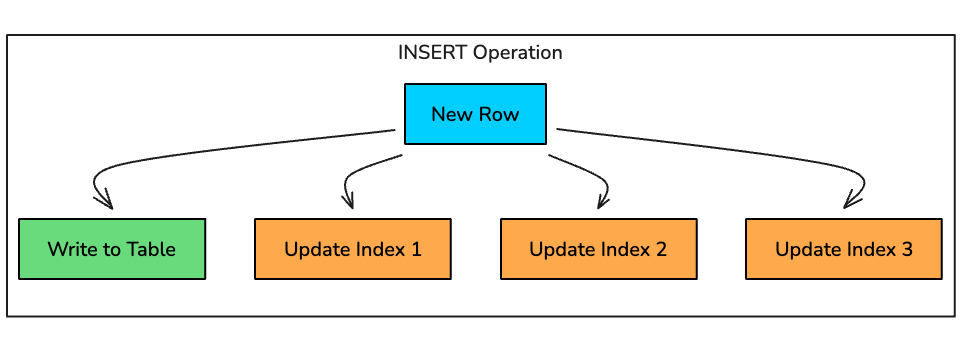
How Each Operation is Affected
INSERT: For every new row, the database must:
Write the row to the table
Find the correct position in each B-Tree index
Insert a new entry in each index
Potentially rebalance the B-Tree if nodes split
UPDATE: When you update an indexed column, the database must:
Update the row in the table
Remove the old entry from the index
Insert a new entry at the correct position
This is essentially a DELETE + INSERT on the index
DELETE: For every deleted row, the database must:
Remove the row from the table
Find and remove the corresponding entry in each index
Potentially rebalance the B-Tree
Real-World Impact
Consider a table with 5 indexes. Every INSERT now requires 6 write operations instead of 1. The overhead compounds quickly:
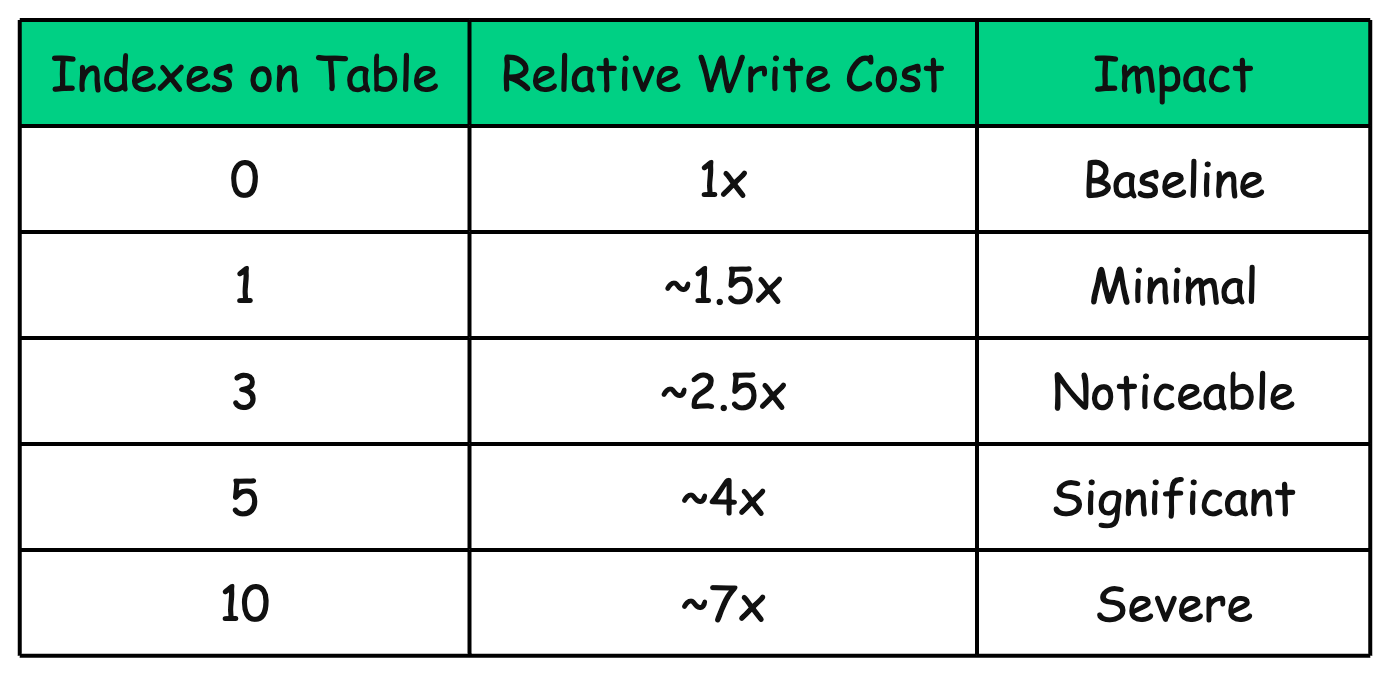
These numbers are approximate and depend on many factors (index type, column size, tree depth), but the trend is clear: more indexes = slower writes.
For write-heavy workloads like logging systems, event tracking, or IoT data ingestion, this overhead can become a serious bottleneck.
2. Storage Overhead
Indexes consume disk space. Sometimes a lot of it.
A single index can be 10-30% the size of the table it indexes. For tables with many indexes, the combined index size can exceed the table itself.
A B-Tree index stores a sorted copy of the indexed column values along with row pointers. For a table with millions of rows, this can add up to significant storage.
In this example, the table data is 5 GB, but the indexes add another 4.3 GB. That’s nearly double the storage.
Composite indexes are even larger because they store multiple column values.
CREATE INDEX idx_orders_user_date_status
ON orders (user_id, created_at, status);This index stores three columns worth of data plus row pointers.
What Determines Index Size?
How much space an index consumes depends on a few key factors:
Column data type: indexing a
VARCHAR(255)usually takes more space than indexing anINT.Number of rows: more rows = more index entries = a bigger index.
Index type: composite indexes store more data per entry, so they tend to be larger.
Fill factor: databases may intentionally leave free space in index pages to reduce page splits during future inserts.
Data uniqueness: lots of duplicates can sometimes compress well (e.g., bitmap-style approaches), but for B-Trees, low selectivity often means less benefit for the space you’re paying.
Checking Index Size in PostgreSQL
To see which indexes are taking the most space run:
SELECT
indexrelname AS index_name,
pg_size_pretty(pg_relation_size(indexrelid)) AS index_size
FROM pg_stat_user_indexes
WHERE schemaname = 'public'
ORDER BY pg_relation_size(indexrelid) DESC;3. Index Maintenance and Fragmentation
Indexes degrade over time. As you insert, update, and delete rows, the B-Tree structure becomes fragmented. This fragmentation has real performance consequences.
How Fragmentation Happens
A B-Tree maintains sorted order. So when you insert a new row, the database has to place the new key in the correct position inside the index.
If the target index page is already full, the database performs a page split: it allocates a new page and redistributes the entries across the two pages. Splits keep the tree balanced, but they often leave both pages only partially filled.
Over time, page splits create:
Internal fragmentation: Pages that are only partially filled, wasting space
External fragmentation: Logically adjacent pages that are physically scattered on disk
The Impact of Fragmentation
Fragmentation makes the index larger and less efficient to read:
More I/O: the database has to touch more pages to traverse the same index.
Wasted storage: half-empty pages still consume full page space.
Worse cache efficiency: fewer useful entries fit in memory, so cache misses increase.
Slower range scans: what should be mostly sequential reads turns into more random reads.
Rebuilding Indexes
Most databases provide commands to rebuild fragmented indexes:
PostgreSQL:
REINDEX INDEX idx_users_email;
-- or rebuild all indexes on a table
REINDEX TABLE users;Rebuilding indexes is not free. It can take time, consume I/O, and often locks the index or table while the operation runs, meaning you might see blocked queries or downtime.
PostgreSQL’s REINDEX CONCURRENTLY option allows rebuilding without blocking other operations, but it typically takes longer.
4. The Problem of Unused Indexes
Here’s a scenario that happens in almost every codebase:
Someone adds an index to speed up a specific query. A few months later, that query gets rewritten or removed but the index stays. It keeps consuming storage, and every insert/update/delete now has to maintain it.
Over time, these “zombie indexes” pile up: they don’t help reads anymore, but they still make writes slower.
Finding Unused Indexes in PostgreSQL
PostgreSQL tracks index usage stats, so you can spot indexes that haven’t been scanned:
SELECT
schemaname,
relname AS table_name,
indexrelname AS index_name,
idx_scan AS times_used,
pg_size_pretty(pg_relation_size(indexrelid)) AS index_size
FROM pg_stat_user_indexes
WHERE idx_scan = 0
AND indexrelid NOT IN (
SELECT indexrelid FROM pg_constraint WHERE contype = 'p'
)
ORDER BY pg_relation_size(indexrelid) DESC;This lists user indexes with zero scans, while excluding primary-key indexes.
“Zero scans” doesn’t always mean “safe to delete.” A few things to double-check:
Time period: Has enough time passed? An index used only for monthly reports might show zero usage if checked mid-month.
Replica queries: If you run analytics queries on a read replica, those aren’t reflected in the primary’s statistics.
Implicit usage: Some indexes support foreign key constraints or unique constraints. Dropping them might break referential integrity.
Backup plan: Before dropping, note the CREATE INDEX statement so you can recreate it if needed.
5. Replication Lag
In a replicated database setup, indexes don’t just affect the primary. They also affect how fast replicas can keep up.
Every write on the primary has to be applied on the replicas as well. And the more indexes a table has, the more work each write generates because the database isn’t only writing the new row, it’s also updating every index that includes that table.
Conceptually, a single insert turns into multiple operations:
This becomes painful when you do bulk writes. Index-heavy tables can create significant replication lag because replicas have to replay a much larger stream of changes.
-- This creates massive replication lag with many indexes
INSERT INTO orders (user_id, amount, ...)
SELECT user_id, amount, ...
FROM staging_orders
WHERE batch_id = 12345; -- 100,000 rowsEach of those 100,000 rows triggers updates to every index, all of which must be replicated.
6. Query Planner Confusion
More indexes don’t automatically mean faster queries. In fact, too many indexes can make performance less predictable because now the query planner has too many “reasonable” paths to choose from.
For every query, the planner estimates the cost of different plans and picks the cheapest one. With lots of indexes, it might:
Pick a suboptimal index (because several look similarly good on paper)
Spend more time planning (more candidate plans to evaluate)
Fall back to a full table scan if it thinks that’s safer or cheaper
Here’s a typical example:
-- Table with many overlapping indexes
EXPLAIN SELECT * FROM orders
WHERE user_id = 101
AND status = 'pending'
AND created_at > '2024-01-01';If orders has a bunch of indexes, the planner might consider options like:
A:
idx_user_id→ then filterstatusandcreated_atB:
idx_status→ then filteruser_idandcreated_atC:
idx_created_at→ then filteruser_idandstatusD:
idx_user_status(composite) → then filtercreated_atE: Full table scan (especially if the planner expects many rows to match)
Stale statistics make this worse
The planner’s decision is only as good as its stats. It relies on statistics about row counts, value distribution, and selectivity.
If those stats are outdated, it can badly misestimate how many rows will match and choose the wrong plan.
Keeping stats fresh helps the planner make better choices.
7. When NOT to Use Indexes
Indexes are powerful, but they’re not a free win. In some cases, an index adds storage and write overhead while giving you little (or zero) improvement on reads.
Here are common situations where indexes can hurt more than help.
Low Cardinality Columns
Indexing a column with few distinct values (like status with values ‘active’, ‘inactive’, ‘pending’) is often wasteful.
If most rows share the same value, say 90% of users are 'active', then using the index still forces the database to fetch most of the table. At that point, a full scan is usually faster.
-- This index is probably useless
CREATE INDEX idx_users_status ON users(status);
-- The query planner might ignore it anyway
SELECT * FROM users WHERE status = 'active';
-- Returns 90% of the table, full scan is fasterException: In some databases, bitmap-style indexing (or bitmap scans) can be efficient for low-cardinality columns, especially in analytics workloads where queries combine multiple filters.
Small Tables
If a table has only a few thousand rows (or less), an index often doesn’t help. Traversing the index and jumping to table pages can cost more than simply scanning the whole table.
Write-Heavy Tables with Few Reads
For tables that are constantly written to (e.g., logs, event streams) indexes can become a tax on every insert. If you rarely query the table in ways that benefit from the index, you’re paying ongoing write cost for almost no payoff.
Frequently Updated Indexed Columns
Indexes are great when column values are stable. If an indexed column changes often, every update becomes more expensive because the database must also update the index structure.
In these cases, ask yourself: Is the read speedup worth the extra write cost?
Columns Used with Functions
A standard B-Tree index can’t help if your query wraps the column in a function, because the planner can’t use the raw column ordering.
-- This won't use an index on created_at
SELECT * FROM orders WHERE YEAR(created_at) = 2024;
-- This can use the index
SELECT * FROM orders
WHERE created_at >= '2024-01-01'
AND created_at < '2025-01-01';If you must use functions, create a function-based index (also called expression index):
-- PostgreSQL
CREATE INDEX idx_orders_year ON orders (EXTRACT(YEAR FROM created_at));8. Guidelines for Indexing Wisely
Given all these hidden costs, how should you approach indexing?
Here are practical guidelines:
1. Measure Before Adding
Don’t guess. Start by understanding what the database is actually doing. Use EXPLAIN to understand query performance:
EXPLAIN ANALYZE
SELECT * FROM orders WHERE user_id = 101;Only add an index if you can clearly show it improves the query plan (and reduces latency) on realistic data.
2. Remove Unused Indexes
Indexes tend to accumulate over time. Make it a habit to audit them (quarterly is a good default) and remove the ones that aren’t pulling their weight.
3. Prefer Composite Indexes Over Multiple Single-Column Indexes
Three single-column indexes often create three different “partial” options for the planner. One well-designed composite index can cover the query more cleanly.
-- Instead of:
CREATE INDEX idx_user ON orders (user_id);
CREATE INDEX idx_date ON orders (created_at);
CREATE INDEX idx_status ON orders (status);
-- Consider:
CREATE INDEX idx_user_date_status ON orders (user_id, created_at, status);(As a rule of thumb, order columns in a composite index based on how your queries filter and sort starting with the most selective and most commonly used leading predicates.)
4. Consider Write/Read Ratio
Index strategy should match workload. A reporting system and a high-ingest event table need very different indexing.
Read-heavy (90%+ reads): more indexes are acceptable
Balanced (roughly 50/50): be selective
Write-heavy (70%+ writes): keep indexes minimal and focused
5. Monitor Index Health
Indexing isn’t “set and forget.” Track signals that tell you whether indexes are helping or quietly hurting:
Index size growth over time
Index scan frequency (which indexes are actually used)
Buffer cache / buffer pool hit ratio
Replication lag during heavy writes or backfills
6. Test Index Changes Under Load
Avoid adding indexes directly in production without pressure-testing. A new index might speed up one query, but slow down writes, increase replication lag, or change plans for other queries.
Key Takeaways
Indexes slow down writes: Every INSERT, UPDATE, and DELETE must update all indexes on the table. More indexes = slower writes.
Indexes consume storage: Often as much or more than the table data itself. This affects memory usage, backup times, and replication.
Indexes fragment over time: Regular maintenance (rebuilding) is necessary to maintain performance.
Unused indexes are costly: They provide zero benefit while still slowing down writes. Audit and remove them regularly.
Not everything needs an index: Low cardinality columns, small tables, and write-heavy workloads often don’t benefit from indexing.
The goal isn’t to minimize indexes, but to have the right indexes. Each index should serve a clear purpose and justify its costs through measurable query improvement.
Thank you for reading!
If you found it valuable, hit a like ❤️ and consider subscribing for more such content every week.


Exceptional breakdown. The write penalty section is probably the most underappreciated part, especially that visual showing 6 operations instead of 1. Most devs I work with focus purely on read optimizaton and then wonder why bulk inserts grind to a halt. The guideline about testing under load before adding indexes is crucial too, seen too many production fires from adding an index that accidentally changed query plans for ten other queries. The 'measure before adding' mindset needs to be default behavior not an afterthought.
Nice