

Top 10 API Gateway Use Cases in System Design

As your system evolves from a monolith to microservices, a pattern quickly emerges: every service starts rebuilding the same things.
Authentication. Rate limiting. Request logging. The same logic gets duplicated across services, with slight variations and inevitable bugs.
An API Gateway fixes this by introducing a single entry point for all client requests.
Instead of spreading these cross-cutting concerns across your services, you move them to one place. The gateway handles routing, security, traffic control, and more, so your services can stay focused on business logic.
In this article, we’ll break down the top 10 API Gateway use cases, how they work, and why they should belong at the gateway layer.
📣 The AI Engineering Masterclass: LLMs to Production Systems

Are you an engineer trying to upskill in AI but still feeling stuck?
AI is moving fast, and while there’s no shortage of content, it’s hard to see how everything fits together to build real systems.
This session is designed to bring structure to AI landscape. In 2.5 hours, you’ll get a clear, step-by-step view of AI engineering, organized into 6 levels, with live demos, notebooks, and an open AMA.
It covers LLM fundamentals and prompt engineering, RAG and how early pipeline decisions shape everything downstream, tool use with MCP, when agents make sense and when they don’t, evaluation as a first-class AI engineering skill, and context engineering as the discipline that ties it all into one system.
Hosted by Shivani Virdi (ex-Microsoft, Amazon, Adobe), who has trained 50+ engineers from top companies including Microsoft, Amazon, and Shopify in a hands-on AI engineering cohort. This masterclass distills that experience into one focused session.
April 16 | 11 AM ET / 08:30 PM IST | Live + AMA
Use code ASHISH20 at checkout to get 20% off (First 10 only).
1. Request Routing
At its core, an API Gateway is a traffic controller. Its primary job is simple: take an incoming request and send it to the right service.
In a microservices architecture, each service owns a specific domain such as users, orders, payments, or inventory. But clients don’t need to know where these services live or how many instances are running. They just send requests to the gateway, and the gateway takes care of the rest.
Routing decisions are usually based on things like the URL path, HTTP method, headers, or query parameters. For example, requests to /api/users go to the User Service, while /api/orders is handled by the Order Service.
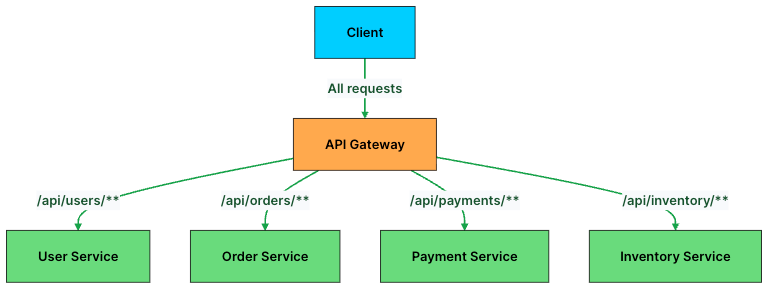
Here’s what a routing configuration looks like in practice:
# API Gateway routing rules
routes:
  - path: /api/users/**
    service: user-service
    methods: [GET, POST, PUT, DELETE]

  - path: /api/orders/**
    service: order-service
    methods: [GET, POST]

  - path: /api/payments/**
    service: payment-service
    methods: [POST]

  - path: /api/inventory/**
    service: inventory-service
    methods: [GET]
Behind the scenes, the gateway often integrates with service discovery systems like Consul or Kubernetes DNS. So when a new instance of a service spins up, the gateway can find it automatically without any manual updates.
This decouples clients from your backend. Services can scale, move, or even be renamed without breaking anything on the client side.
But routing alone isn’t enough. Once a request reaches your system, you still need to decide whether the client should be allowed to make that request in the first place.
2. Authentication and Authorization
Every API request needs to answer two questions: Who is this? And are they allowed to do this?
Without an API Gateway, each microservice has to implement its own authentication and authorization logic. That quickly leads to duplicated code, inconsistent checks, and subtle security gaps.
An API Gateway fixes this by making security a first-class, centralized concern. It intercepts every request, validates the credentials, and only forwards requests that pass the checks. By the time a request reaches a backend service, it’s already trusted.
The most common approach is validating a JWT (JSON Web Token). The client sends the token in the Authorization header, and the gateway verifies its signature, expiration, and permissions before routing the request.
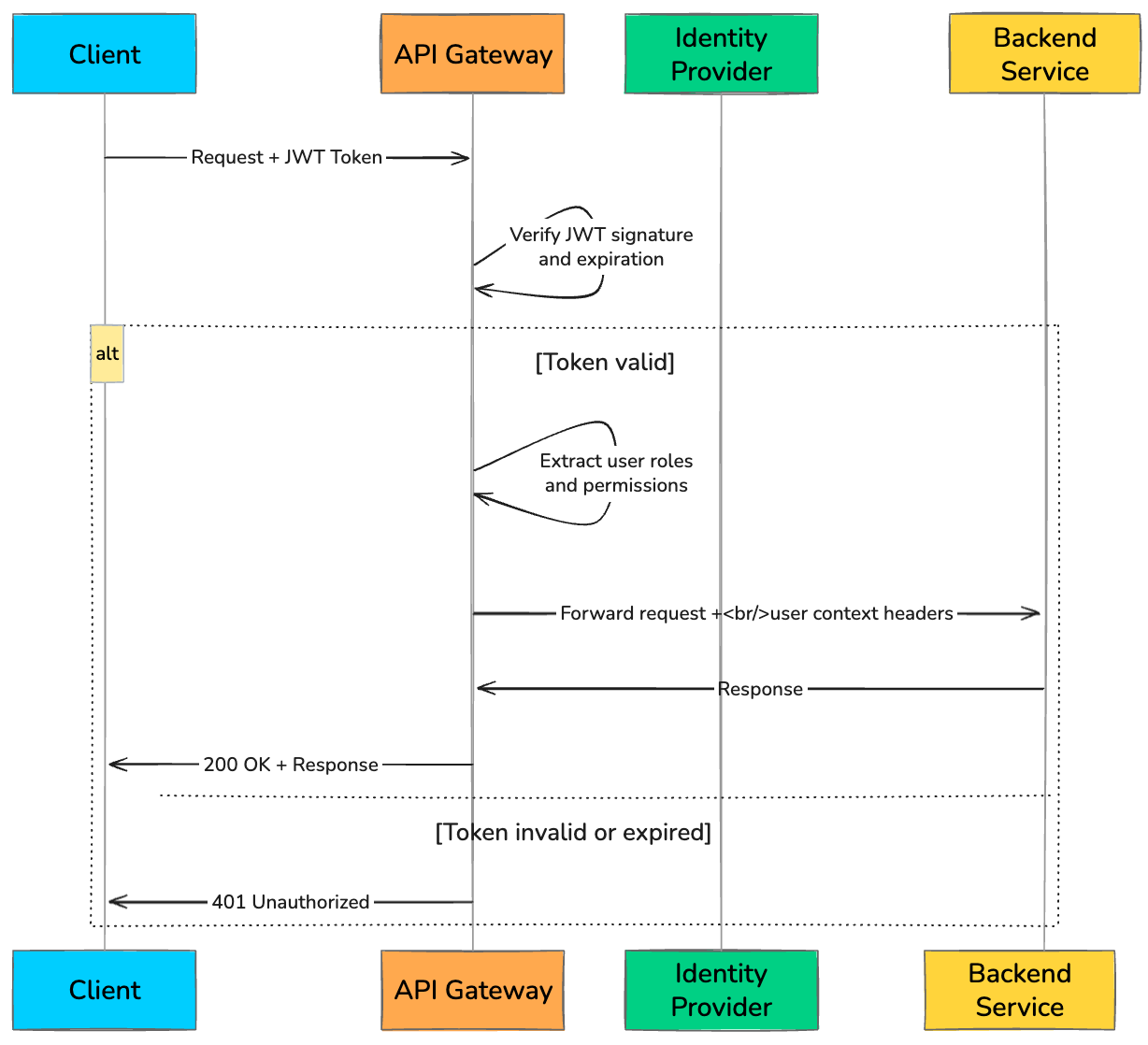
A typical token validation flow at the gateway looks like this:
def authenticate_request(request):
    token = request.headers.get("Authorization", "").replace("Bearer ", "")

    if not token:
        return {"status": 401, "error": "Missing token"}

    try:
        # Verify JWT signature and decode claims
        payload = jwt.decode(token, PUBLIC_KEY, algorithms=["RS256"])

        # Check token expiration
        if payload["exp"] < current_time():
            return {"status": 401, "error": "Token expired"}

        # Check if user has required role for this endpoint
        required_role = get_required_role(request.path, request.method)
        if required_role not in payload.get("roles", []):
            return {"status": 403, "error": "Insufficient permissions"}

        # Attach user context for downstream services
        request.headers["X-User-ID"] = payload["sub"]
        request.headers["X-User-Roles"] = ",".join(payload["roles"])
        return {"status": 200, "user": payload}

    except jwt.InvalidTokenError:
        return {"status": 401, "error": "Invalid token"}
Gateways can also support API keys for internal services and OAuth 2.0 flows for third-party integrations. The key idea is simple: enforce security once, at the edge, instead of reimplementing it everywhere.
Once you know who the client is and what they can do, the next challenge is controlling how much they can do without overwhelming your system.
3. Rate Limiting and Throttling
Even well-behaved clients can overwhelm your system if they send too many requests too quickly. A mobile app bug, an aggressive retry loop, or a sudden traffic spike can flood your backend and bring it down.
Rate limiting and throttling act as your first line of defense.
Rate limiting controls how many requests a client can make within a time window.
Throttling slows down or queues excess requests instead of rejecting them immediately.
The API Gateway enforces these limits before traffic reaches your services, protecting your entire system from overload.
Some commonly used algorithms include:
Token Bucket
Sliding Window
Fixed Window
Leaky Bucket
Here’s a simplified example of Token Bucket rate limiting at the gateway:
def check_rate_limit(client_id, max_tokens=100, refill_rate=10):
    """
    Token bucket: max 100 requests, refills 10 tokens per second.
    """
    bucket = redis.get(f"rate:{client_id}")

    if bucket is None:
        # First request: initialize bucket
        redis.set(f"rate:{client_id}", max_tokens - 1, ex=60)
        return True

    tokens = int(bucket)

    # Refill tokens based on elapsed time
    last_refill = redis.get(f"rate:{client_id}:last_refill")
    elapsed = current_time() - float(last_refill or 0)
    tokens = min(max_tokens, tokens + int(elapsed * refill_rate))

    if tokens > 0:
        redis.set(f"rate:{client_id}", tokens - 1)
        redis.set(f"rate:{client_id}:last_refill", current_time())
        return True

    # No tokens left: reject with 429
    return False
If a client exceeds the limit, the gateway typically returns a 429 Too Many Requests response, often with a Retry-After header to guide the client on when to retry.
Rate limiting protects the backend from excessive traffic. But there’s another concern at the network level: securing the connection itself.
4. SSL Termination
Every API request should be sent over HTTPS. But TLS encryption and decryption come at a cost. If every service handles TLS on its own, you end up wasting CPU across the system and managing certificates in dozens of places.
SSL termination solves this by moving all TLS handling to the API Gateway.
Clients connect to the gateway over HTTPS. The gateway decrypts the request, and then forwards it to backend services over HTTP within the internal network.
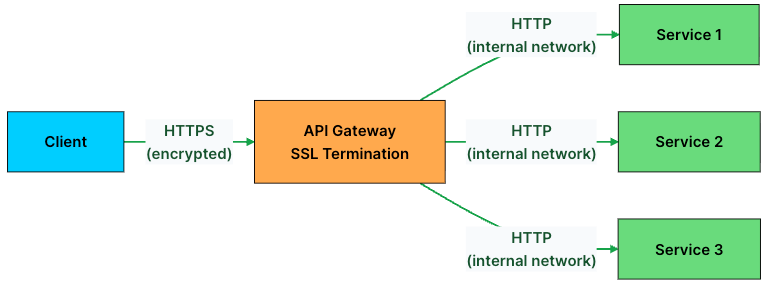
This approach has several benefits:
Centralized certificate management: You renew and rotate TLS certificates in one place instead of on every service.
Reduced backend CPU load: Backend services skip the overhead of TLS handshakes and encryption.
Simpler service configuration: Backend services don’t need to know anything about certificates or TLS versions.
In environments that require end-to-end encryption, such as finance or healthcare, the gateway can re-encrypt traffic using mutual TLS (mTLS) before sending it to backend services. This ensures both sides verify each other, adding an extra layer of trust.
With secure communication in place, the next step is deciding how to distribute incoming traffic across your services.
5. Load Balancing
Backend services rarely run as a single instance. For scalability and reliability, you usually have multiple instances of the same service running in parallel.
When a request hits the API Gateway, it needs to decide: which instance should handle this?
That’s where load balancing comes in.
The gateway continuously monitors the health of backend instances and distributes traffic using one of several algorithms like:
Round Robin
Least Connections
Weighted Routing
IP Hash
Least Response Time
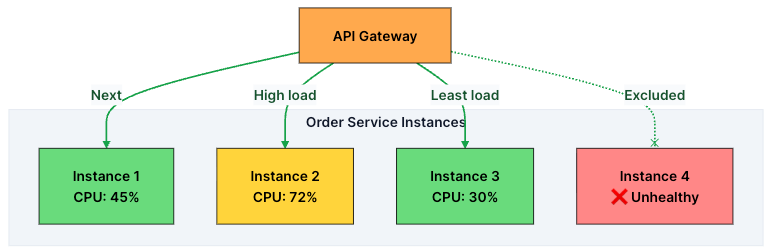
To make good decisions, the gateway continuously performs health checks on each instance, typically every few seconds. If an instance fails multiple checks, it’s removed from the pool. Once it recovers, it’s added back automatically.
It’s worth noting that this is different from a standalone load balancer like AWS Application Load Balancer. A dedicated load balancer operates at the infrastructure level and focuses on routing traffic based on network signals.
An API Gateway, on the other hand, combines load balancing with higher-level concerns like authentication, rate limiting, and request transformation. In many real-world systems, both are used together: the load balancer handles low-level traffic distribution, while the gateway manages application-level logic.
Load balancing ensures requests reach healthy instances. But sometimes, the request itself needs to be reshaped before the backend can handle it.
6. Request and Response Transformation
In a real system, backend services don’t always speak the same language as clients.
A mobile app might send JSON, while a legacy service expects XML. One service returns timestamps in Unix format, while the client expects ISO 8601. A third-party API might use snake_case, but your frontend is built around camelCase.
Instead of forcing every service and client to adapt to each other, the API Gateway sits in the middle and handles these differences.
It transforms requests before they reach the backend and reshapes responses before they go back to the client.
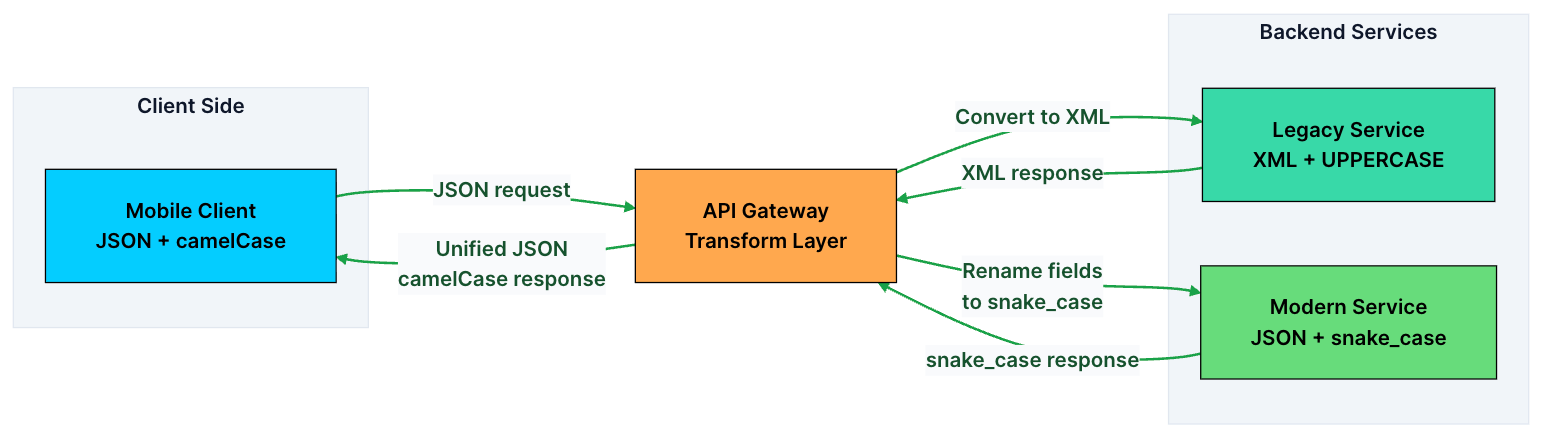
Common transformations include:
Format conversion: JSON to XML (or vice versa)
Field renaming:
user_nametouserNameField filtering: Stripping sensitive fields (like
ssnorinternal_id) from responses before sending them to clientsRequest enrichment: Adding headers like
X-Request-ID,X-User-Region, or geolocation data before forwarding to backend servicesResponse aggregation: Combining responses from multiple services into a single response (the Backend for Frontend pattern)
This becomes especially valuable during migrations. You can evolve or replace backend services without breaking clients, because the gateway handles the translation layer.
Transformation keeps your system flexible and backward-compatible. But not every request needs to reach the backend in the first place, especially when the response rarely changes.
7. Caching
If thousands of users are requesting the same data, like a product catalog, there’s no reason to hit your backend every single time.
This is where caching at the API Gateway helps.
Instead of forwarding every request, the gateway can store frequently accessed responses and serve them directly. This reduces load on your backend and significantly improves response times.
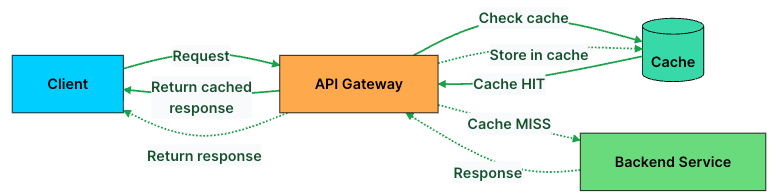
The gateway typically caches based on the request URL, query parameters, and relevant headers. Here’s the basic logic:
def handle_request(request):
    cache_key = generate_cache_key(request.path, request.query_params)

    # Check cache first
    cached_response = cache.get(cache_key)
    if cached_response and not is_expired(cached_response):
        return cached_response  # Cache HIT: return immediately

    # Cache MISS: forward to backend
    response = forward_to_backend(request)

    # Cache the response with a TTL
    if response.status == 200 and is_cacheable(request.method):
        cache.set(cache_key, response, ttl=300)  # Cache for 5 minutes

    return response
That said, not everything should be cached.
Good candidates: GET requests for relatively static data like product listings, configs, or public content
Avoid caching: POST, PUT, DELETE requests, or anything user-specific
Most gateways also respect standard HTTP caching headers like Cache-Control, ETag, and Expires. Some even support fine-grained invalidation, so you can clear specific entries when the underlying data changes.
Caching is great for handling repeated requests efficiently. But as your system evolves, you’ll often need to support multiple versions of the same API at the same time.
8. API Versioning
APIs don’t stay the same forever. You add fields, tweak response formats, and sometimes redesign entire endpoints. But clients don’t upgrade overnight.
Mobile apps take time to update. Third-party integrations depend on stable contracts. Some clients may keep using older versions for months or even years.
The API Gateway makes this manageable by routing requests to the right version of a service based on a version identifier in the request, such as a URL path (/v1/users vs /v2/users), headers, or query parameters.
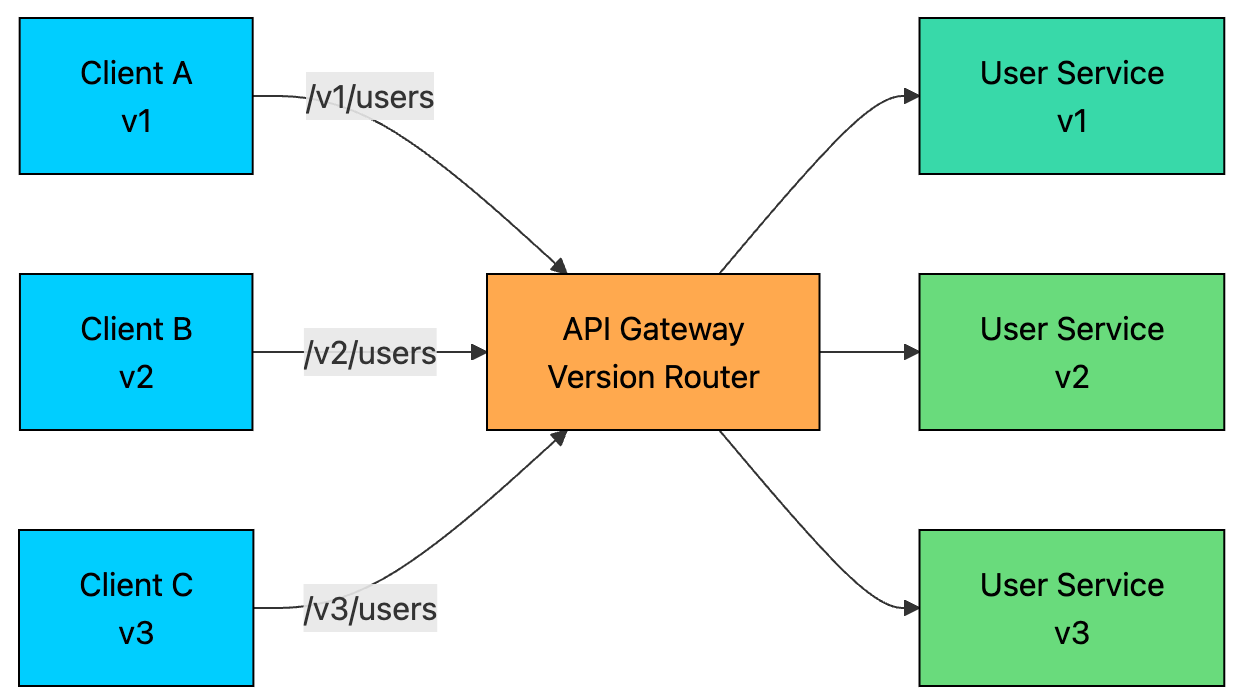
This lets multiple versions of the same API coexist without breaking clients.
It also enables gradual rollouts.
When you launch a new version, say v3 of the User Service, you don’t have to switch everything at once. You can route:
90% of traffic to v2
10% to v3
As confidence grows, you shift more traffic to v3. If something goes wrong, you can instantly roll back to v2 without touching any client code.
Once you’re sure no active clients are using an older version, you can safely deprecate it at the gateway and shut down the service behind it.
Versioning gives you flexibility to evolve your system without breaking users. But as you run more versions and services, complexity grows. To manage that, you need visibility into what’s happening across your system.
9. Observability: Logging, Monitoring, and Tracing
In a microservices system, a single request can pass through 5–10 services before returning a response. When something breaks, a slow response, a spike in errors, a timeout, you need to quickly figure out where things went wrong.
The API Gateway is the perfect place to capture this data. Every request flows through it, so it gives you a complete view of your system’s behavior.
Observability at the gateway covers three pillars:
Logging: Every request is recorded with details like path, method, status code, latency, client IP, and user ID. This gives you a reliable audit trail for debugging and analysis.
Monitoring: Metrics are aggregated across all traffic. You track things like request rate, error rate, and latency percentiles (p50, p95, p99). These power dashboards and alerts.
Distributed tracing: Each request is assigned a unique trace ID that flows through every service it touches. This lets you follow a single request end to end.
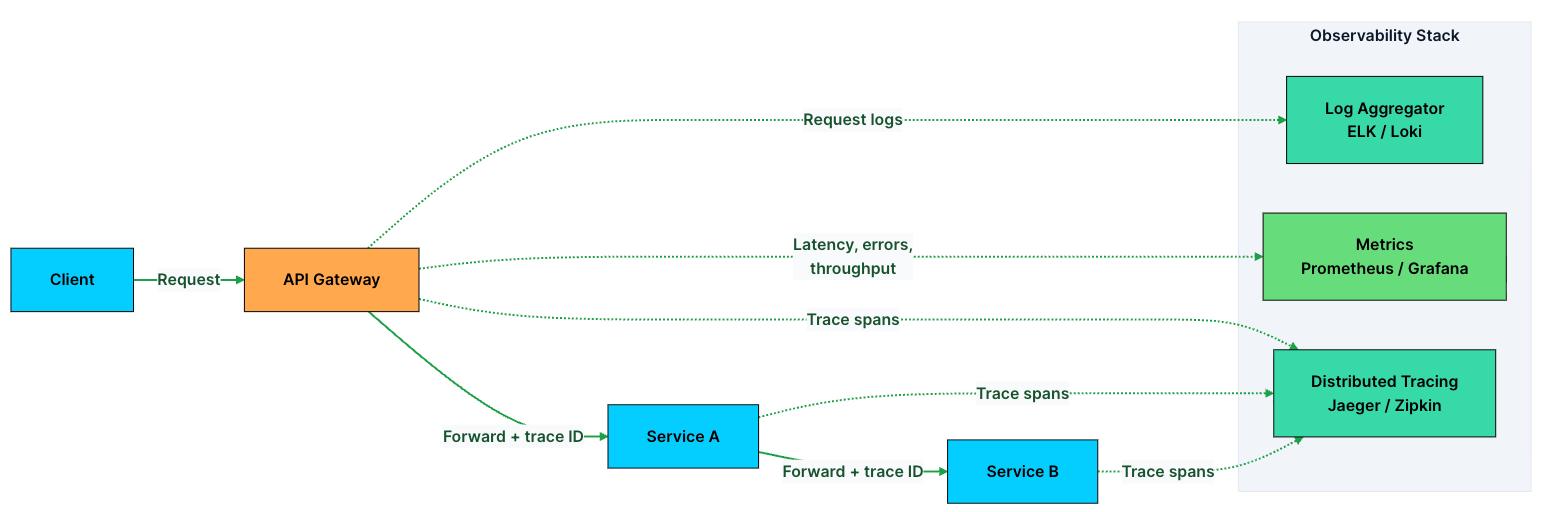
In practice, the gateway generates headers like X-Request-ID and X-Trace-ID for every incoming request and forwards them downstream. When something fails, you can search using the trace ID and reconstruct the entire journey, which services were called, how long each took, and where the failure occurred.
These signals also feed into alerting systems. For example, if p99 latency crosses a threshold or error rates spike, you get notified before users start noticing issues.
Observability helps you detect problems quickly. But detection alone isn’t enough. You also need a way to contain failures before they spread across the system.
10. Circuit Breaking and Fault Tolerance
When a backend service starts failing or slowing down, blindly retrying requests makes things worse.
Requests keep piling up, the struggling service gets overwhelmed, thread pools fill up, and the failure starts spreading to other parts of the system. This is how cascading failures happen.
A circuit breaker prevents this by acting as a safety switch.
It continuously monitors a service’s health, and when failures cross a threshold, it stops sending traffic to that service for a while. Instead, the gateway returns a fallback response, like cached data or a graceful error, without even touching the failing backend.
A circuit breaker typically moves through three states:
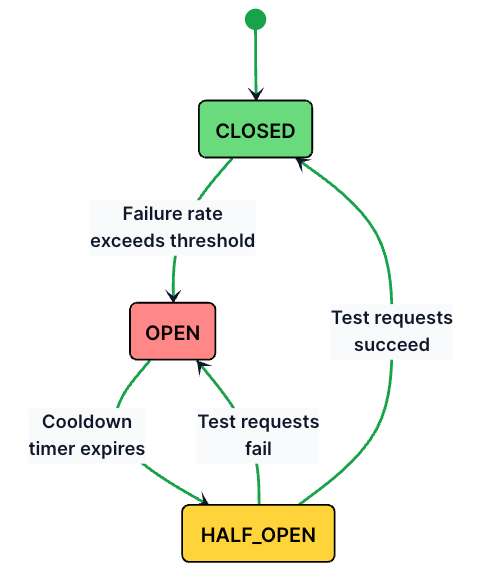
Here’s how these states work:
Closed (normal operation): All requests pass through to the backend. The circuit breaker tracks success and failure counts.
Open (service failing): If the failure rate exceeds a threshold (e.g., 50% of the last 20 requests fail), the circuit opens. All requests are immediately rejected with a fallback response. No traffic reaches the failing backend.
Half-Open (testing recovery): After a cooldown period (e.g., 30 seconds), the circuit lets a small number of test requests through. If they succeed, the circuit closes and normal traffic resumes. If they fail, the circuit opens again.
class CircuitBreaker:
    def __init__(self, failure_threshold=5, cooldown_seconds=30):
        self.state = "CLOSED"
        self.failure_count = 0
        self.failure_threshold = failure_threshold
        self.cooldown_seconds = cooldown_seconds
        self.last_failure_time = None

    def handle_request(self, request):
        if self.state == "OPEN":
            if self._cooldown_expired():
                self.state = "HALF_OPEN"
            else:
                return fallback_response(request)

        try:
            response = forward_to_backend(request)
            if self.state == "HALF_OPEN":
                self.state = "CLOSED"
                self.failure_count = 0
            return response

        except ServiceUnavailableError:
            self.failure_count += 1
            self.last_failure_time = current_time()

            if self.failure_count >= self.failure_threshold:
                self.state = "OPEN"

            return fallback_response(request)

    def _cooldown_expired(self):
        elapsed = current_time() - self.last_failure_time
        return elapsed >= self.cooldown_seconds
Beyond circuit breaking, the gateway can also implement:
Retries with exponential backoff: Automatically retry failed requests with increasing delays (1s, 2s, 4s) to give the backend time to recover.
Timeouts: Kill requests that take too long instead of waiting indefinitely and tying up resources.
Bulkheads: Isolate resource pools per service so that a slow Payment Service can’t consume all the gateway’s connections and starve the User Service.
Together, these patterns ensure that one unhealthy service doesn’t bring down the entire system.
Thank you for reading!
If you found it valuable, hit a like ❤️ and consider subscribing for more such content every week.
If you have any questions/suggestions, feel free to leave a comment.