

How to Use AI Effectively in Large Codebases

AI coding assistants are everywhere now.
GitHub Copilot, Cursor, Claude, ChatGPT. Every developer has tried at least one.
And for small projects, they work great. But something breaks when you try to use these tools in a large, production codebase.
The suggestions become generic. The AI hallucinates function names that don’t exist. It confidently tells you to import a module that isn’t in your project.
This isn’t a flaw in the AI models themselves. It’s a context problem.
And understanding this problem is the key to actually getting value from AI in professional software development.
In this article, I’ll share why AI struggles with large codebases and share practical tips for using it effectively at that scale.
📣 Better Context. Better Agent. Better Code. Better Code Review.
Augment Code is an AI coding assistant built for real-world engineering teams shipping millions of lines of code.
They recently launched an industry-leading code review tool that actually understands context, not just diffs.
Instead of blindly reacting to changed lines, Augment loads the full picture – the files your PR touches, the dependencies around them, and the architecture three layers deep.
What does that look like in practice?
Code reviews with full-codebase awareness, not just the diff you pushed.
Inline comments, right in GitHub: no extra dashboards or tools to check.
One-click fixes from your IDE or terminal with Augment Code
High-signal comments developers actually read
Why AI Struggles with Large Codebases
To understand why AI coding tools struggle at scale, you need to understand how they work.
When you ask an AI assistant a question about your code, it needs context. Without context, it’s just guessing based on patterns it learned during training.
Here’s the problem: most AI tools have a very limited view of your codebase.
What AI sees:

What it needs to see:
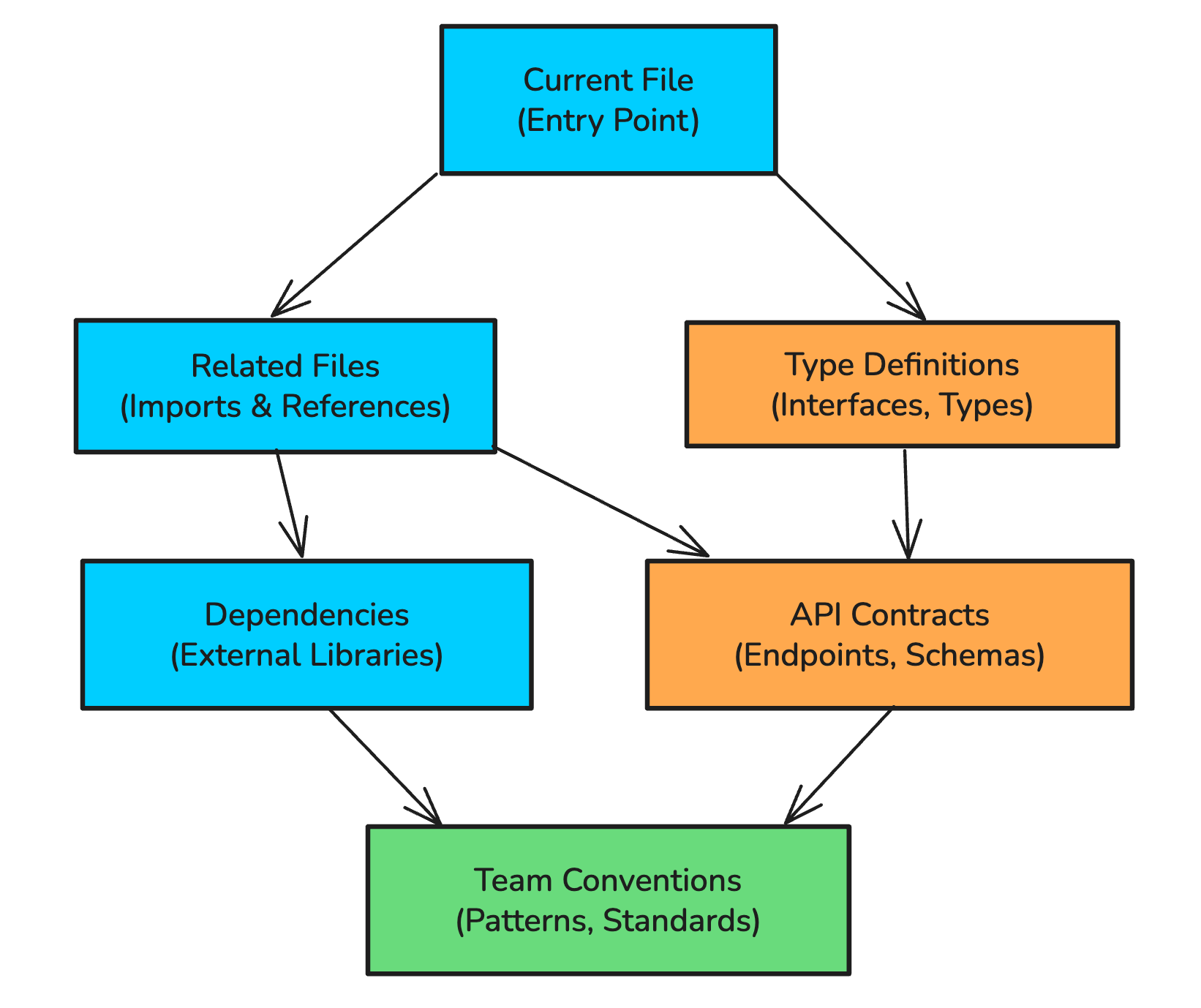
The Context Window Problem
Every LLM has a context window, the maximum amount of text it can consider at once. Even with context windows of 100K+ tokens, you can’t just dump your entire codebase into a prompt.
A typical production codebase might have:
10,000+ source files
1 million+ lines of code
Hundreds of internal APIs
Years of accumulated conventions and patterns
You can’t fit that into any context window. So AI tools have to be selective about what they include.
Most tools solve this by looking at:
The file you’re currently editing
Maybe a few open tabs
Sometimes files you’ve recently viewed
That’s it. The AI has no idea about your authentication service three directories over, the utility functions your team uses constantly, or the database schema that defines your data model.
The Stale Context Problem
Here’s another issue that gets overlooked: your codebase changes constantly.
You switch branches multiple times a day. Your teammates merge PRs. You run search-and-replace across dozens of files. The code that existed five minutes ago might not exist now.
Most AI indexing systems update on a schedule, often every 10 minutes or longer. In that time, you might have:
Switched to a feature branch
Renamed a key function
Added new type definitions
Merged in your colleague’s changes
If the AI’s understanding of your codebase is 10 minutes old, it’s working with outdated information. It might suggest importing a module that was just renamed, or recommend a function signature that no longer exists.
This is especially painful when you’re doing code review. You check out a PR branch, ask the AI about the changes, and it responds based on the main branch because its index hasn’t caught up yet.
The Retrieval Problem (And Why It Matters)
At its core, making AI useful in large codebases is a retrieval problem.
The AI model itself is powerful. GPT-4, Claude, and others can understand and generate code remarkably well. The bottleneck is getting the right context into the model’s prompt before it generates a response.
This is conceptually similar to RAG (Retrieval Augmented Generation) for documents, but with code-specific challenges:
Code relationships are complex
Unlike documents, code has rich structural relationships. A function definition isn’t just similar to its call sites textually, it’s semantically connected. Documentation isn’t necessarily similar to the code it describes.
Generic embedding models trained on text don’t capture these relationships well.
Context relevance isn’t just about similarity
When you’re writing code, the most “relevant” context isn’t always the most similar text. If you’re implementing a new API endpoint, you probably need:
Similar endpoints for pattern matching
The authentication middleware
Data validation utilities
Database query helpers
Error handling conventions
These aren’t necessarily textually similar to what you’re writing, but they’re essential context.
Some “relevant” context is actually useless
Here’s a counterintuitive point: sometimes the most semantically similar code is the least helpful.
If you’re using PyTorch and the AI retrieves PyTorch source code, that’s probably not useful. The model already knows how PyTorch works. It was trained on that. What it doesn’t know is your specific project structure, your team’s conventions, your custom utilities.
The ideal retrieval system prioritizes helpfulness over raw relevance.
What Actually Works
After years of trying to make AI useful in professional development, here’s what I’ve learned actually matters:
1. Deep Codebase Indexing
The AI needs to understand your entire codebase, not just open files.
This means:
Indexing all source files, not just recent ones
Understanding relationships between files (imports, dependencies, call graphs)
Capturing type definitions, interfaces, and schemas
Learning your project structure and conventions
The index also needs to stay current. If you switch branches, the AI should immediately understand the new state of the code. If you rename a function, it should know about that within seconds, not minutes.
2. Context-Aware Retrieval
When you ask a question or request a code change, the AI needs to pull in relevant context intelligently.
Good retrieval considers:
Direct relationships: What files import this one? What does this file import?
Semantic relationships: What other code does similar things?
Structural context: What’s the project structure around this file?
Historical patterns: How has your team solved similar problems before?
3. Branch-Aware Understanding
Your AI assistant needs to understand that you work on branches.
When you switch from main to feature/new-auth, everything changes. The AI should:
Immediately understand the new branch state
Not mix up code from different branches
Handle rebases and merges gracefully
Provide suggestions based on the current branch, not a stale main
4. Security-Conscious Architecture
For production codebases, security isn’t optional.
The AI system should:
Respect access controls (don’t retrieve code the user can’t access)
Not send sensitive code to third-party APIs unnecessarily
Maintain audit trails of what was accessed
Comply with your organization’s security requirements
How Augment Code Approaches This
This is where I want to talk about Augment Code, our sponsor for this post.
I’ve been using Augment for the past few weeks, and it solves many of the problems I described above in ways that other tools don’t.
Real-Time Indexing
Augment maintains a personal search index for each developer that updates within seconds of code changes.
When you switch branches in git, when you do a search-and-replace across 100 files, when your colleague’s PR gets merged, Augment’s index reflects those changes almost immediately.
I tested it.
I downloaded the Kafka source code from GitHub (around 7,000 files, 300+ MB). Augment indexed it in under a minute. I asked questions about Kafka’s internals, like “show me the code path for storing messages to log files”, and it found the relevant code paths accurately.
On my own project (1,000+ files), the index updated in about 10 seconds.
Custom Embedding Models
Augment doesn’t use generic embedding models like most tools.
They’ve trained custom models specifically for code retrieval. These models understand that:
A function call site is related to its definition (even though they look different)
Documentation is related to the code it describes
Code in different languages can be semantically related
Common library code (like PyTorch internals) doesn’t need to be retrieved since the model already knows it
This matters because generic embeddings optimized for text similarity often miss the connections that matter in code.
The Prompt Enhancer
This is something Augment users consistently mention as their favorite feature.
You don’t have to be a prompt engineer to get good results. The system takes your simple request and automatically enriches it with relevant context from your codebase.
I tested this on my website project. I gave it a minimal prompt: “Update comment component to allow users to edit their comments.”
No additional context. No file paths. No architecture explanation.
Augment built the complete feature in one prompt: UI components, database calls, edge case handling, everything. It understood my project’s patterns, my component structure, my database schema, and generated code that fit naturally.
That’s what good retrieval enables. The model has all the context it needs to make intelligent decisions.
Security By Design
Augment self-hosts their embedding search and doesn’t use third-party APIs for retrieval. This matters because research has shown that embeddings can be reverse-engineered back to source code.
They also implement proof-of-possession for file access. The IDE has to prove it knows a file’s content before the backend will return information about that file. This prevents retrieving code you’re not authorized to access.
Practical Tips for Using AI in Large Codebases
Whether you’re using Augment or another tool, here are strategies that help:
1. Provide Explicit Context
Don’t assume the AI knows your codebase structure.
Instead of:
Fix the bug in the user serviceTry:
In src/services/user/authentication.ts, the validateToken
function is not checking token expiration correctly.
It should use the exp claim from the JWT payload.
Explicit file paths and specific details help the AI focus on the right area.
2. Reference Related Files
If you know what files are relevant, mention them.
Update the UserProfile component (src/components/UserProfile.tsx)
to display the user’s subscription status.

The subscription data comes from the useSubscription hook
(src/hooks/useSubscription.ts) and follows the same pattern
as the useAccount hook.
3. Explain Your Conventions
AI tools don’t automatically know your team’s patterns.
Create a new API endpoint for updating user preferences.

Follow the same pattern as the existing endpoints in
src/api/routes/:
- Use the validateRequest middleware
- Return responses using the ApiResponse wrapper
- Log errors to the auditLogger
4. Work Iteratively
Don’t expect perfect results on the first try.
Start with a simple request, review what the AI generates, and provide corrections. Each iteration helps narrow in on what you actually need.
5. Use AI for Exploration
Large codebases are hard to navigate. AI tools excel at questions like:
“How does authentication work in this codebase?”
“What’s the flow when a user places an order?”
“Where is the database connection configured?”
These exploration queries help you get oriented quickly, even in unfamiliar code.
The Future of AI in Professional Development
The tools we have today are just the beginning.
As retrieval systems get better, as context windows expand, and as models become more capable, AI assistants will become genuinely useful for complex professional work.
The key insight is that model capability isn’t the bottleneck anymore. Context is. The teams building the best code understanding, the best retrieval systems, and the best context management will build the most useful tools.
This is why I’m excited about tools like Augment that focus specifically on professional development in large codebases. They’re solving the hard problems that make AI actually useful, not just impressive in demos.
Try Augment Code
If you work with large codebases and want to see what proper context awareness looks like, try Augment Code.
They have:
VS Code and JetBrains extensions
A CLI tool for terminal users
SOC 2 Type II compliance for enterprise requirements
A free trial to test it on your own codebase
A newly launched industry leading code review tool
The best way to evaluate any AI tool is to try it on your actual work. See if it understands your codebase, your conventions, your patterns.
The biggest challenge with large codebases isn't the code itself - it's that AI can't hold it all at once. Context windows have hard limits. The real skill is knowing how AI chunks, summarizes, and reconstructs large files behind the scenes. Once you understand that, you work with the constraint instead of against it. https://imphan.substack.com/p/how-ai-reads-files-bigger-than-its-memory